Home/Models/Google/Veo 3.1 Pro
G

Veo 3.1 Pro

Per Richiesta:$2
Veo 3.1-Pro si riferisce all’accesso/configurazione con capacità elevate della famiglia Veo 3.1 di Google — una generazione di modelli video in formato breve, con supporto audio, che aggiungono un audio nativo più ricco, controlli narrativi/di montaggio migliorati e strumenti per l’estensione delle scene.
Nuovo
Uso commerciale
Playground
Panoramica
Caratteristiche
Prezzi
API
Versioni

Veo 3.1-Pro refers to the high-capability access/configuration of Google’s Veo 3.1 family — a generation of short-form, audio-enabled video models that add richer native audio, improved narrative/editing controls and scene-extension tools; the “Pro” label is commonly used to indicate higher access or quality tiers in Google’s subscription and product ecosystem rather than to denote a radically different public architecture.

How to access Veo 3.1 Pro API

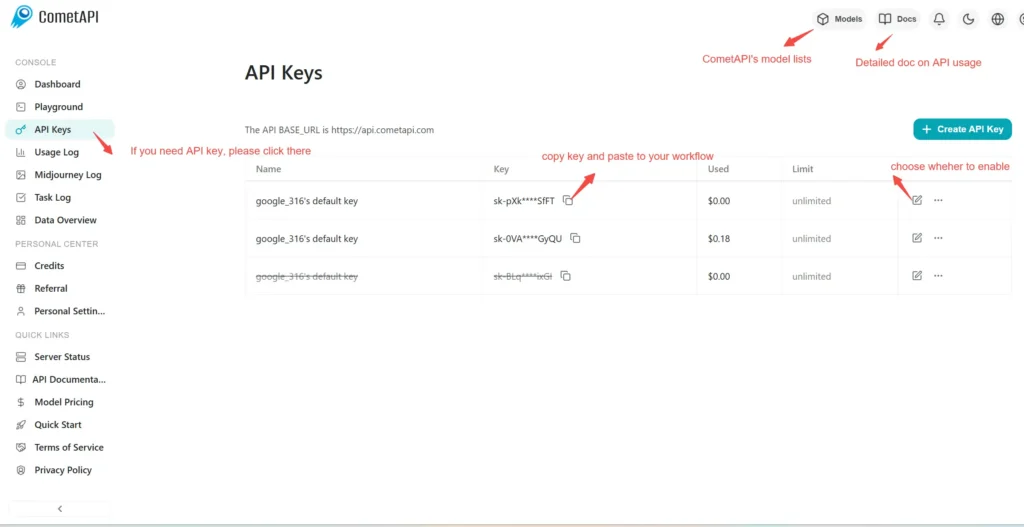
Step 1: Sign Up for API Key

Log in to cometapi.com. If you are not our user yet, please register first. Sign into your CometAPI console. Get the access credential API key of the interface. Click “Add Token” at the API token in the personal center, get the token key: sk-xxxxx and submit.
img

Step 2: Send Requests to Veo 3 Pro API

Select the “\veo3.1-pro \” endpoint to send the API request and set the request body. The request method and request body are obtained from our website API doc. Our website also provides Apifox test for your convenience. Replace <YOUR_API_KEY> with your actual CometAPI key from your account. base url is Veo3 Async Generation(https://api.cometapi.com/v1/videos).

Insert your question or request into the content field—this is what the model will respond to . Process the API response to get the generated answer.

Step 3: Retrieve and Verify Results

Process the API response to get the generated answer. After processing, the API responds with the task status and output data.

To learn more about Veo3.1, please see the Veo3.1 page.

Funzionalità per Veo 3.1 Pro

Esplora le caratteristiche principali di Veo 3.1 Pro, progettato per migliorare le prestazioni e l'usabilità. Scopri come queste funzionalità possono beneficiare i tuoi progetti e migliorare l'esperienza utente.

Prezzi per Veo 3.1 Pro

Esplora i prezzi competitivi per Veo 3.1 Pro, progettato per adattarsi a vari budget e necessità di utilizzo. I nostri piani flessibili garantiscono che paghi solo per quello che usi, rendendo facile scalare man mano che i tuoi requisiti crescono. Scopri come Veo 3.1 Pro può migliorare i tuoi progetti mantenendo i costi gestibili.
Prezzo Comet (USD / M Tokens)Prezzo Ufficiale (USD / M Tokens)Sconto
Per Richiesta:$2
Per Richiesta:$2.5
-20%

Codice di esempio e API per Veo 3.1 Pro

Accedi a codice di esempio completo e risorse API per Veo 3.1 Pro per semplificare il tuo processo di integrazione. La nostra documentazione dettagliata fornisce una guida passo dopo passo, aiutandoti a sfruttare appieno il potenziale di Veo 3.1 Pro nei tuoi progetti.
Python
Curl
import os
import time
import requests

# Get your CometAPI key from https://api.cometapi.com/console/token, and paste it here
COMETAPI_KEY = os.environ.get("COMETAPI_KEY") or "<YOUR_COMETAPI_KEY>"
BASE_URL = "https://api.cometapi.com/veo/v1/video"

# Create video generation task
create_response = requests.post(
    f"{BASE_URL}/create",
    headers={
        "Authorization": COMETAPI_KEY,
        "Content-Type": "application/json",
    },
    json={
        "prompt": "An orange cat flying in the blue sky with white clouds, sunlight pouring onto its fur, creating a beautiful and dreamlike scene",
        "model": "veo3.1-pro",
        "enhance_prompt": True,
    },
)

task = create_response.json()
task_id = task["id"]
print(f"Task created: {task_id}")
print(f"Status: {task['status']}")

# Poll until video is ready
while True:
    query_response = requests.get(
        f"{BASE_URL}/query/{task_id}",
        headers={
            "Authorization": f"Bearer {COMETAPI_KEY}",
        },
    )

    result = query_response.json()
    status = result["data"]["status"]
    progress = result["data"].get("progress", "")

    print(f"Checking status... {status} {progress}")

    if status == "SUCCESS" or result["data"]["data"]["status"] == "completed":
        video_url = result["data"]["data"]["video_url"]
        print(f"
Video URL: {video_url}")
        break
    elif status == "FAILED":
        print(f"Failed: {result['data'].get('fail_reason', 'Unknown error')}")
        break

    time.sleep(10)

Versioni di Veo 3.1 Pro

Il motivo per cui Veo 3.1 Pro dispone di più snapshot può includere fattori potenziali come variazioni nell'output dopo aggiornamenti che richiedono snapshot precedenti per coerenza, offrire agli sviluppatori un periodo di transizione per l'adattamento e la migrazione, e diversi snapshot corrispondenti a endpoint globali o regionali per ottimizzare l'esperienza utente. Per le differenze dettagliate tra le versioni, si prega di fare riferimento alla documentazione ufficiale.
version
veo3.1-pro

Altri modelli