What is FLUX.2 Flex
FLUX.2 is the “flexible” (managed API) member of the FLUX.2 product family from Black Forest Labs. It is designed for developers and creative teams who need:
- explicit control over generation parameters (inference steps, guidance scale, etc.) so they can trade speed for fidelity during iterative workflows;
- robust typography / text rendering and very fine detail handling (infographics, UI mockups, product labels); and
- reliable multi-reference editing (combine elements across several photos while maintaining identity/consistency).
FLUX.2 is offered as multiple product variants (Pro, Flex, Dev, Klein) that target different usage patterns — Flex sits between Pro (highest quality + fixed latency) and Dev (open-weight checkpoint for research/local use).
Key features (what FLUX.2 Flex brings to the table)
- Controllable generation: explicit parameters (steps, guidance scale) to balance speed vs. prompt fidelity.
- High-resolution output: capable of production outputs up to 4 megapixels (4MP) while preserving detail.
- Multi-reference inputs: accepts multiple reference images (Flex supports up to 10 reference images; Dev/Pro numbers vary by tier). This enables consistent character/product renderings across outputs.
- Improved typography and text rendering: BFL emphasizes substantially improved rendering of glyphs, kerning and multi-line layouts — making FLUX.2 attractive for UI, packaging and infographics.
- Managed API with megapixel pricing (predictable cost model): pricing for Flex uses a per-megapixel model (see Pricing section).
Technical details of FLUX.2 Flex
Core architecture: FLUX.2 uses a latent flow-matching backbone (flow transformer) combined with a vision-language model (BFL states it couples a Mistral-3 24B VLM with a rectified flow transformer). The VAE used by FLUX.2 was re-trained to improve the learnability/quality/compression tradeoff. These choices help with world knowledge, compositional logic and tighter prompt adherence.
FLUX.2 : typical generation times reported ~22 s (text-only) and ~40 s (with input image), accepts up to 10 inputs and is priced around $0.048 per megapixel (input + output combined) on CometAPI.
Model name: black-forest-labs/flux-2-flex
Input constraints: Flex accepts multiple inputs (up to 10 inputs in the managed offering) and a total input megapixel limit is enforced (quote a 14MP maximum aggregated input ). Output resolution beyond 4MP is typically downsampled or limited by the service.
Benchmark performance of FLUX.2 Flex
Human-style win-rate evaluation (vendor benchmark): In BFL’s published head-to-head tests, FLUX.2 variants (notably ) showed strong win rates vs. contemporary open models: ~66.6% win rate in text-to-image, 59.8% in single-reference editing and 63.6% in multi-reference editing vs. other open models cited. BFL also presented an ELO vs. per-image cost chart placing FLUX.2 variants in the ~1030–1050 ELO band at per-image costs in the 2–6 cent range .
Limitations of FLUX.2 Flex
- Cost scaling with references / resolution: Flex uses per-megapixel pricing. Adding multiple reference images or raising output resolution increases cost linearly under the advertised megapixel model . For workflows that iterate with many references, cost can accumulate quickly.
- Prompt/consistency failure modes: Although FLUX.2 improves character consistency, complex multi-attribute prompts can still produce failures (artifacts, unexpected blending, or pose/identity drift) depending on prompt design and number of references.
- Content & safety: While BFL reports strong resilience in moderation/violative-input tests, image models are not perfect; risks remain for generating copyrighted material, impersonation, or unsafe content.
Typical / recommended use cases
- Ad and marketing image variants where the same model/actor/product must remain consistent across many scenes or backgrounds (multi-reference consistency).
- Product photography & virtual try-on (preserve product details across backgrounds).
- Editorial/fashion spreads requiring the same identity across many shots.
- Rapid prototyping and research (dev checkpoint allows experimentation, fine-tuning and LoRA/adapter workflows).
How to access Flux.2 Flex API
Step 1: Sign Up for API Key
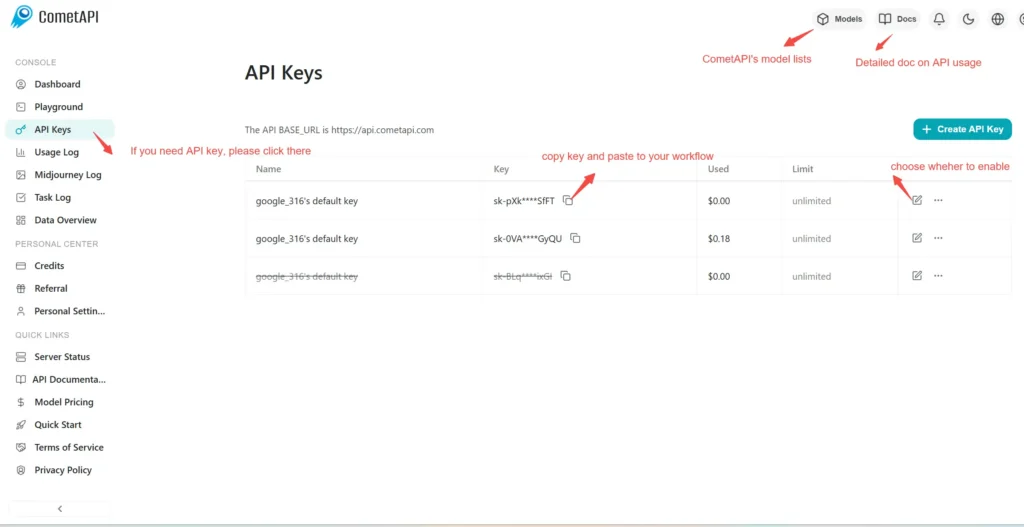
Log in to cometapi.com. If you are not our user yet, please register first. Sign into your CometAPI console. Get the access credential API key of the interface. Click “Add Token” at the API token in the personal center, get the token key: sk-xxxxx and submit.
Step 2: Send Requests to Flux.2 Flex API
Select the “black-forest-labs/flux-2-flex ”endpoint to send the API request and set the request body. The request method and request body are obtained from our website API doc. Our website also provides Apifox test for your convenience. Replace <YOUR_API_KEY> with your actual CometAPI key from your account.
Insert your question or request into the content field—this is what the model will respond to . Process the API response to get the generated answer.
Step 3: Retrieve and Verify Results
Process the API response to get the generated answer. After processing, the API responds with the task status and output data.
CometAPI Now Supporting Replicate Format Models: 🔹 black-forest-labs/flux-2-pro 🔹 black-forest-labs/flux-2-dev 🔹 black-forest-labs/flux-2-flex
Limited Time Promotion: Lower than Replicate Official Pricing!
👇 Start Building Now Create Predictions – API Doc
⚡ Flexible Selection:
- Pro: Designed for high-efficiency production and fast delivery.
- Flex: Maximizes image quality with adjustable parameters.
- Dev: Developer-friendly optimization.