Home/Models/Google/Veo 3.1 Pro
G

Veo 3.1 Pro

リクエストごと:$2
Veo 3.1-Pro は、Google の Veo 3.1 ファミリーの上位機能向けアクセス/設定を指します—より豊かなネイティブ音声、改善されたナラティブ/編集コントロール、シーン拡張ツールを追加した短尺の音声対応ビデオモデルの世代です。
新着
商用利用
Playground
概要
機能
料金プラン
API
バージョン

Veo 3.1-Pro refers to the high-capability access/configuration of Google’s Veo 3.1 family — a generation of short-form, audio-enabled video models that add richer native audio, improved narrative/editing controls and scene-extension tools; the “Pro” label is commonly used to indicate higher access or quality tiers in Google’s subscription and product ecosystem rather than to denote a radically different public architecture.

How to access Veo 3.1 Pro API

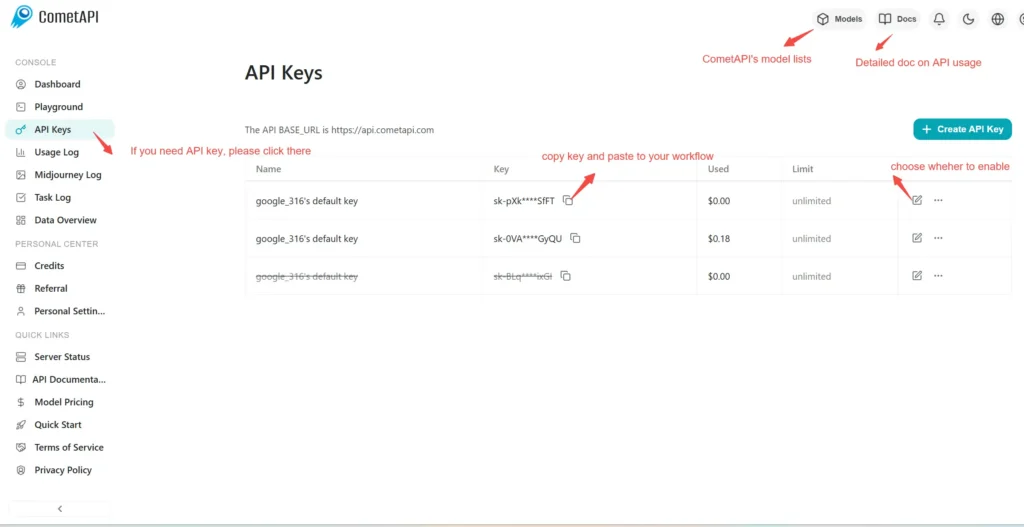
Step 1: Sign Up for API Key

Log in to cometapi.com. If you are not our user yet, please register first. Sign into your CometAPI console. Get the access credential API key of the interface. Click “Add Token” at the API token in the personal center, get the token key: sk-xxxxx and submit.
img

Step 2: Send Requests to Veo 3 Pro API

Select the “\veo3.1-pro \” endpoint to send the API request and set the request body. The request method and request body are obtained from our website API doc. Our website also provides Apifox test for your convenience. Replace <YOUR_API_KEY> with your actual CometAPI key from your account. base url is Veo3 Async Generation(https://api.cometapi.com/v1/videos).

Insert your question or request into the content field—this is what the model will respond to . Process the API response to get the generated answer.

Step 3: Retrieve and Verify Results

Process the API response to get the generated answer. After processing, the API responds with the task status and output data.

To learn more about Veo3.1, please see the Veo3.1 page.

Veo 3.1 Proの機能

Veo 3.1 Proのパフォーマンスと使いやすさを向上させるために設計された主要機能をご紹介します。これらの機能がプロジェクトにどのようなメリットをもたらし、ユーザーエクスペリエンスを改善するかをご確認ください。

Veo 3.1 Proの料金

Veo 3.1 Proの競争力のある価格設定をご確認ください。さまざまな予算や利用ニーズに対応できるよう設計されています。柔軟なプランにより、使用した分だけお支払いいただけるため、要件の拡大に合わせて簡単にスケールアップできます。Veo 3.1 Proがコストを管理しながら、お客様のプロジェクトをどのように強化できるかをご覧ください。
コメット価格 (USD / M Tokens)公式価格 (USD / M Tokens)割引
リクエストごと:$2
リクエストごと:$2.5
-20%

Veo 3.1 ProのサンプルコードとAPI

Veo 3.1 Proの包括的なサンプルコードとAPIリソースにアクセスして、統合プロセスを効率化しましょう。詳細なドキュメントでは段階的なガイダンスを提供し、プロジェクトでVeo 3.1 Proの潜在能力を最大限に活用できるよう支援します。
Python
Curl
import os
import time
import requests

# Get your CometAPI key from https://api.cometapi.com/console/token, and paste it here
COMETAPI_KEY = os.environ.get("COMETAPI_KEY") or "<YOUR_COMETAPI_KEY>"
BASE_URL = "https://api.cometapi.com/veo/v1/video"

# Create video generation task
create_response = requests.post(
    f"{BASE_URL}/create",
    headers={
        "Authorization": COMETAPI_KEY,
        "Content-Type": "application/json",
    },
    json={
        "prompt": "An orange cat flying in the blue sky with white clouds, sunlight pouring onto its fur, creating a beautiful and dreamlike scene",
        "model": "veo3.1-pro",
        "enhance_prompt": True,
    },
)

task = create_response.json()
task_id = task["id"]
print(f"Task created: {task_id}")
print(f"Status: {task['status']}")

# Poll until video is ready
while True:
    query_response = requests.get(
        f"{BASE_URL}/query/{task_id}",
        headers={
            "Authorization": f"Bearer {COMETAPI_KEY}",
        },
    )

    result = query_response.json()
    status = result["data"]["status"]
    progress = result["data"].get("progress", "")

    print(f"Checking status... {status} {progress}")

    if status == "SUCCESS" or result["data"]["data"]["status"] == "completed":
        video_url = result["data"]["data"]["video_url"]
        print(f"
Video URL: {video_url}")
        break
    elif status == "FAILED":
        print(f"Failed: {result['data'].get('fail_reason', 'Unknown error')}")
        break

    time.sleep(10)

Veo 3.1 Proのバージョン

Veo 3.1 Proに複数のスナップショットが存在する理由としては、アップデート後の出力変動により旧版スナップショットの一貫性維持が必要な場合、開発者に適応・移行期間を提供するため、グローバル/リージョナルエンドポイントに対応する異なるスナップショットによるユーザー体験最適化などが考えられます。各バージョンの詳細な差異については、公式ドキュメントをご参照ください。
version
veo3.1-pro

その他のモデル