Home/Models/Google/Veo 3 Pro
G

Veo 3 Pro

요청당:$2
Veo 3 pro는 프로덕션급 Veo 3 비디오 모델 경험(고충실도, 네이티브 오디오 및 확장된 툴링)을 의미합니다.
새로운
상업적 사용
Playground
개요
기능
가격
API
버전

How to access Veo 3 Pro API

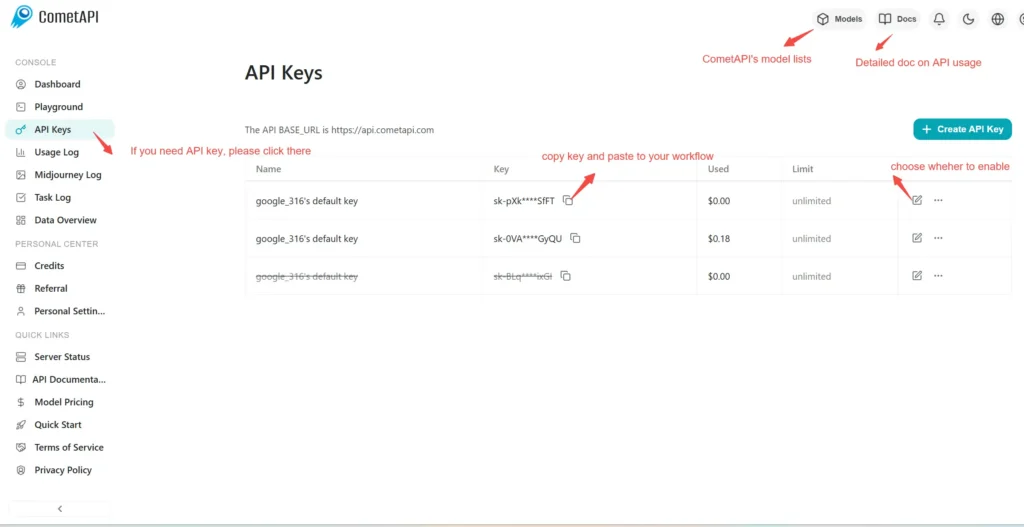
Step 1: Sign Up for API Key

Log in to cometapi.com. If you are not our user yet, please register first. Sign into your CometAPI console. Get the access credential API key of the interface. Click “Add Token” at the API token in the personal center, get the token key: sk-xxxxx and submit.
img

Step 2: Send Requests to Veo 3 Pro API

Select the “\veo3-pro \” endpoint to send the API request and set the request body. The request method and request body are obtained from our website API doc. Our website also provides Apifox test for your convenience. Replace <YOUR_API_KEY> with your actual CometAPI key from your account. base url is Veo3 Async Generation(https://api.cometapi.com/v1/videos).

Insert your question or request into the content field—this is what the model will respond to . Process the API response to get the generated answer.

Step 3: Retrieve and Verify Results

Process the API response to get the generated answer. After processing, the API responds with the task status and output data.

To learn more about Veo3, please see the Veo3 page.

Veo 3 Pro의 기능

[모델 이름]의 성능과 사용성을 향상시키도록 설계된 주요 기능을 살펴보세요. 이러한 기능이 프로젝트에 어떻게 도움이 되고 사용자 경험을 개선할 수 있는지 알아보세요.

Veo 3 Pro 가격

[모델명]의 경쟁력 있는 가격을 살펴보세요. 다양한 예산과 사용 요구에 맞게 설계되었습니다. 유연한 요금제로 사용한 만큼만 지불하므로 요구사항이 증가함에 따라 쉽게 확장할 수 있습니다. [모델명]이 비용을 관리 가능한 수준으로 유지하면서 프로젝트를 어떻게 향상시킬 수 있는지 알아보세요.
코멧 가격 (USD / M Tokens)공식 가격 (USD / M Tokens)할인
요청당:$2
요청당:$2.5
-20%

Veo 3 Pro의 샘플 코드 및 API

[모델 이름]의 포괄적인 샘플 코드와 API 리소스에 액세스하여 통합 프로세스를 간소화하세요. 자세한 문서는 단계별 가이드를 제공하여 프로젝트에서 [모델 이름]의 모든 잠재력을 활용할 수 있도록 돕습니다.
Python
JavaScript
Curl
import os
import time
import requests

# Get your CometAPI key from https://api.cometapi.com/console/token, and paste it here
COMETAPI_KEY = os.environ.get("COMETAPI_KEY") or "<YOUR_COMETAPI_KEY>"
BASE_URL = "https://api.cometapi.com/veo/v1/video"

# Create video generation task
create_response = requests.post(
    f"{BASE_URL}/create",
    headers={
        "Authorization": COMETAPI_KEY,
        "Content-Type": "application/json",
    },
    json={
        "prompt": "An orange cat flying in the blue sky with white clouds, sunlight pouring onto its fur, creating a beautiful and dreamlike scene",
        "model": "veo3.1-pro",
        "enhance_prompt": True,
    },
)

task = create_response.json()
task_id = task["id"]
print(f"Task created: {task_id}")
print(f"Status: {task['status']}")

# Poll until video is ready
while True:
    query_response = requests.get(
        f"{BASE_URL}/query/{task_id}",
        headers={
            "Authorization": f"Bearer {COMETAPI_KEY}",
        },
    )

    result = query_response.json()
    status = result["data"]["status"]
    progress = result["data"].get("progress", "")

    print(f"Checking status... {status} {progress}")

    if status == "SUCCESS" or result["data"]["data"]["status"] == "completed":
        video_url = result["data"]["data"]["video_url"]
        print(f"
Video URL: {video_url}")
        break
    elif status == "FAILED":
        print(f"Failed: {result['data'].get('fail_reason', 'Unknown error')}")
        break

    time.sleep(10)

Veo 3 Pro의 버전

Veo 3 Pro에 여러 스냅샷이 존재하는 이유는 업데이트 후 출력 변동으로 인해 일관성을 유지하기 위해 이전 스냅샷을 보관하거나, 개발자에게 적응 및 마이그레이션을 위한 전환 기간을 제공하거나, 글로벌 또는 지역별 엔드포인트에 따라 다양한 스냅샷을 제공하여 사용자 경험을 최적화하기 위한 것 등이 포함될 수 있습니다. 버전 간 상세한 차이점은 공식 문서를 참고해 주시기 바랍니다.
veo3-pro
veo3-pro-framesThe veo3-frames model is specifically optimized for frame sequence generation.The veo3-frames model is specifically optimized for frame sequence generation, and includes a diagram supporting the first and last frames.

더 많은 모델