What is the GPT-Image-1.5 API?
GPT-Image-1.5 is the newest member of OpenAI’s GPT Image family and the model behind ChatGPT’s revamped Images experience. It’s designed to move image generation from novelty experiments into production-grade creative tooling: higher photorealism, finer control for iterative edits, and faster inference to support interactive and enterprise workflows.
The gpt-image-1.5 API is a multimodal image model endpoint that accepts one or more image inputs (file identifiers or bytes) plus a text prompt and returns generated images or edited images. It supports:
- Text-to-image generation (create from prompt),
- Image editing / in-painting / compositing (apply instructions to existing images, multiple image inputs allowed), and
- Iterative, multi-turn editing workflows through the Responses API (enables “tweak & iterate” UIs).
The API treats image prompts differently from old DALL·E limits: GPT image models accept significantly longer text prompts (the 32k-character guideline), making complex, constraint-heavy instructions feasible.
Main features (practical)
- Improved editability / multi-turn consistency: preserves character appearance, lighting and key visual attributes across iterative edits. This makes “same model, repeated edits” more reliable for workflows like product catalogs or brand assets.
- Faster throughput — 4× speed improvements over GPT Image 1, aimed at lowering latency for iterative creative workflows.
- Cost optimizations — image input/output costs reduced by about 20% vs. GPT Image 1, lowering per-image iteration costs for high-volume users.
- Multi-image compositing & style referencing — accept multiple reference images to composite scenes or transfer style/lighting.
- Quality/fidelity knobs — API parameters that trade off speed vs. fidelity (use lower quality for bulk generation; higher quality for production assets).
- Multi-turn editing / Responses API integration — enables stepwise workflows (ask for changes, then “make tweaks” preserving state).
Technical capabilities
- Text prompt limit (image models): up to 32,000 characters (note: OpenAI documents this as the text length allowance for GPT image models). Use this for long, constraint-heavy prompts.
- Image inputs: accepts File IDs (preferred for multi-turn flows) or raw bytes; multiple images may be provided for compositing and reference.
- Outputs: PNG/JPEG or platform default image artifacts returned by the API (or as attachments within ChatGPT). Outputs can include multiple candidate images and support iterative requests to refine an output.
- Generation modes: text-to-image, image editing (inpaint/extend with instructions), and variants. Multi-turn editing supports “add/subtract/combine” style instructions.
- Instruction-aware editing: models are optimized for instruction fidelity (preserving specified invariants like “do not change the logo”, “keep pose and lighting”). Prompt-engineering patterns (explicit invariants repeated each iteration) reduce semantic drift.
Benchmark performance
- Leaderboard placement: One aggregate report cited GPT Image 1.5 leading text-to-image rankings with ~1264 points on an Artificial Analysis leaderboard, ahead of the next model by a measurable margin.
- Task-level metrics (edit & preservation): a Microsoft Foundry summary of evaluation metrics shows GPT-Image-1.5 achieving near-perfect binary modification success (100% on a single-turn BinaryEval) and strong face-preservation scores (around 90% on AuraFace measures) in their comparison table versus competitors and previous OpenAI models. Those comparative metrics place GPT-Image-1.5 ahead of some rivals on preservation and edit fidelity.
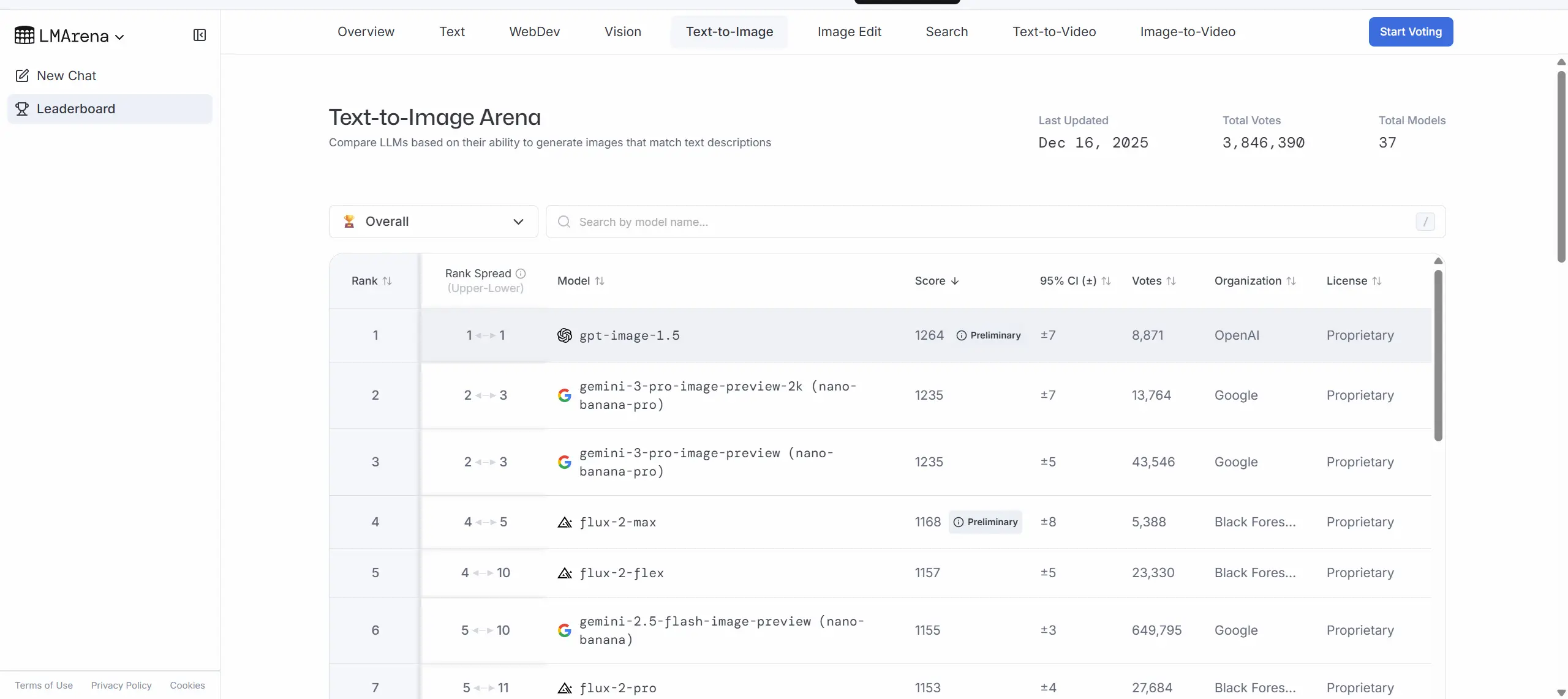
How GPT-Image-1.5 compares to peers
- Vs. GPT Image 1 (previous OpenAI generation): faster (up to 4×), cheaper (~20% lower image IO cost), and stronger edit fidelity — targeted at moving from “prototype/demo” to “production-friendly” image workflows.
- Vs. Google’s Nano Banana Pro / Gemini image models: GPT-Image-1.5 and Google’s Nano Banana Pro / Gemini 3 family as close rivals — each has strengths in different prompt classes. OpenAI’s messaging emphasizes editing fidelity and iteration speed; Google’s offering has been praised for studio-level realism in some examples.
- Vs. Qwen Image and other open/closed models: GPT-Image-1.5 outperforming Qwen Image on several edit and preservation metrics in single-turn evaluations, but differences narrow in multi-turn or other domain-specific tests.
Where GPT-Image-1.5’s strong
- E-commerce product imaging: bulk variants, background swaps, consistent product catalogs from a single photo (brand/logo preservation).
- Creative & marketing asset production: quick concept iterations, photorealistic mockups, controlled style transfers.
- Photo retouching & editorial workflows: realistic clothing/hairstyle try-ons, selective retouching that preserves identity and lighting.
- Design tooling integration: plug into design platforms or CMS for on-demand image variants (fidelity knobs help cost control).
- Multi-step compositing pipelines: multi-image inputs allow compositing and reference-based generation for complex scenes.
How to access GPT Image 1.5 API
Step 1: Sign Up for API Key
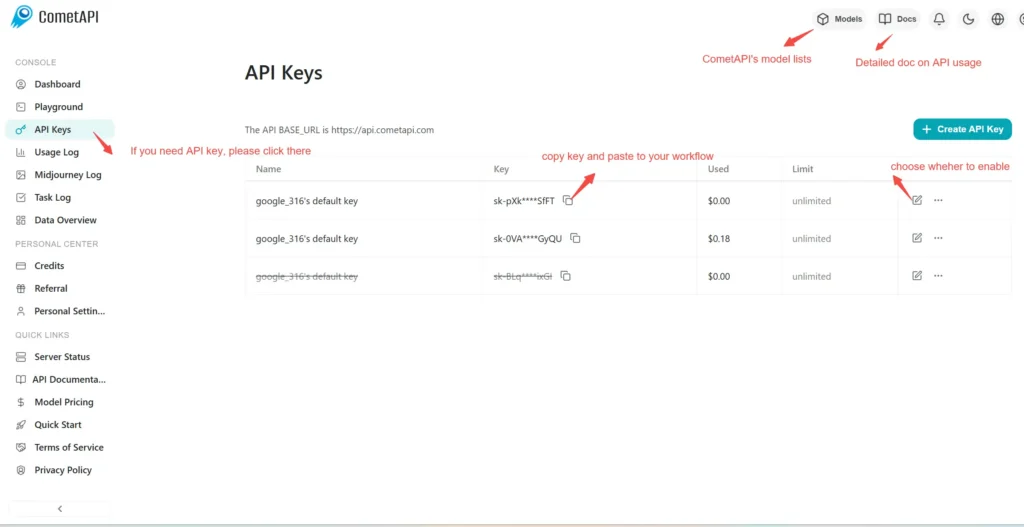
Log in to cometapi.com. If you are not our user yet, please register first. Sign into your CometAPI console. Get the access credential API key of the interface. Click “Add Token” at the API token in the personal center, get the token key: sk-xxxxx and submit.
Step 2: Send Requests to GPT Image 1.5 API
Select the “gpt-image-1.5” endpoint to send the API request and set the request body. The request method and request body are obtained from our website API doc. Our website also provides Apifox test for your convenience. Replace <YOUR_API_KEY> with your actual CometAPI key from your account. base url is Images (https://api.cometapi.com/v1/images/generations) and [Image Editing]
Insert your question or request into the content field—this is what the model will respond to . Process the API response to get the generated answer.
Step 3: Retrieve and Verify Results
Process the API response to get the generated answer. After processing, the API responds with the task status and output data.
See also Gemini 3 Pro Preview API