Technical Specifications of Qwen3.8-Flash
| Specification | Qwen3.8-Flash |
|---|---|
| Provider | Alibaba / Qwen |
| Model family | Qwen3.8 |
| Model ID | qwen3.8-flash |
| Model type | Multimodal reasoning model |
| Input modalities | Text, image, video |
| Output modality | Text |
| Context window | 1,000,000 tokens |
| Maximum output | 128,000 tokens |
| Maximum reasoning budget | 262,144 tokens |
| Thinking mode | Supported |
| Function calling | Supported |
| Built-in tools | Supported |
Qwen's current API documentation lists qwen3.8-flash as a production Qwen3.8 model with a 1M-token context window and 128K maximum output. It supports text, image and video input, function calling, built-in tools and structured output.
For visual workloads, the documented limits include up to 16 megapixels per image, up to 2,048 image URLs or 250 Base64 images, and up to 64 videos, with videos up to 2 hours.
What Is Qwen3.8-Flash?
Qwen3.8-Flash is Alibaba's cost-efficient multimodal reasoning model in the Qwen3.8 family, designed for coding, agentic workflows, long-context analysis and visual understanding. It provides the same 1M-token context class as Qwen3.8-Max while targeting substantially lower API cost. Qwen's own developer guidance explicitly recommends Qwen3.8-Flash when users want similar capabilities at a lower price, while Qwen3.8-Max is positioned as the stronger reasoning option.
The model is particularly interesting because "Flash" does not mean a simple small model. The production API model combines long-context reasoning, multimodal input, tool use and structured output in a relatively inexpensive endpoint.
What Are the Main Features of Qwen3.8-Flash?
- 1M-token context: Qwen3.8-Flash can process extremely long documents and codebases, making it suitable for repository analysis and long-running agent sessions.
- Multimodal understanding: The API accepts text, images and video, allowing developers to combine code, screenshots, charts, documents and video in one workflow.
- Reasoning mode: The model supports Qwen's thinking mode, with a documented maximum reasoning budget of 262,144 tokens.
- Agent and tool support: Function calling and built-in tools are supported, including capabilities such as web search, code execution and related Qwen-hosted tools.
- Structured output: Developers can request structured responses, making the model easier to integrate into applications that require JSON or schema-constrained results.
- Long-video understanding: The visual API documentation lists video inputs of up to two hours, making Qwen3.8-Flash useful for video analysis rather than only short image-captioning tasks.
What Are the Best Use Cases for Qwen3.8-Flash?
Coding and Software Engineering
The 1M-token context is useful for large repositories, long debugging sessions and multi-file code analysis. The model's function-calling and reasoning support also make it suitable for coding agents rather than only code completion.
Agentic Workflows
Qwen3.8-Flash supports function calling and built-in tools, allowing an application to let the model retrieve information, execute code or interact with external systems.
Long-Document Analysis
A million-token context makes the model appropriate for large contracts, technical documentation, research collections and enterprise knowledge bases where repeatedly chunking information would otherwise be necessary.
Video and Visual Analysis
Qwen3.8-Flash accepts both images and video. The current visual API limits allow videos up to two hours, making it relevant to meeting recordings, tutorials, lectures, demonstrations and long-form visual content analysis.
Cost-Sensitive Production AI
This is arguably the model's biggest commercial advantage. Qwen explicitly recommends Flash as the lower-cost alternative to Qwen3.8-Max, making it suitable for high-volume applications where flagship-level reasoning is unnecessary on every request.
What Are the Limitations of Qwen3.8-Flash?
Qwen3.8-Flash should not be interpreted as the highest-performing model in the Qwen3.8 family simply because it shares the 1M context window with Qwen3.8-Max.
The primary trade-off is capability versus cost: Qwen itself recommends Qwen3.8-Max when the strongest reasoning performance is required.
A second consideration is that a 1M context window does not mean every request should contain one million tokens. Large contexts increase processing requirements, and developers should use retrieval, caching and context management when the entire context is unnecessary.
Finally, developers should distinguish the hosted qwen3.8-flash from the open-weight Qwen3.8-Flash-Next. The latter is the architectural preview and has independently documented weights and architecture; the production API model should be documented according to its own API specifications.
Is Qwen3.8-Flash Good for Production API Applications?
Yes, particularly when the application needs multimodal reasoning, long context, tool use and relatively low token cost.
It is a stronger production candidate than Flash-Next when the requirement is simply to call a hosted Qwen API, because qwen3.8-flash is explicitly exposed as a production model in Qwen's API documentation with defined context, output, tool and multimodal limits.
For maximum reasoning quality, Qwen3.8-Max remains the more appropriate choice. For high-volume workloads where cost and throughput matter more, Qwen3.8-Flash is the more economical option.
Qwen3.8-Flash API Parameters
A standard OpenAI-compatible request can use parameters such as:
| Parameter | Purpose |
|---|---|
| model | qwen3.8-flash |
| messages | Conversation and multimodal input |
| temperature | Sampling control |
| max_tokens | Maximum generated output |
| stream | Streaming responses |
| tools | Function/tool definitions |
| tool_choice | Tool-selection behavior |
| response_format | Structured-output configuration |
| enable_thinking | Enables reasoning mode in supported Qwen APIs |
Quick-start documentation uses the OpenAI SDK with the model identifier qwen3.8-flash. The example enables reasoning with extra_body={"enable_thinking": True}.
How to Use qwen3.8-flash API in CometAPI
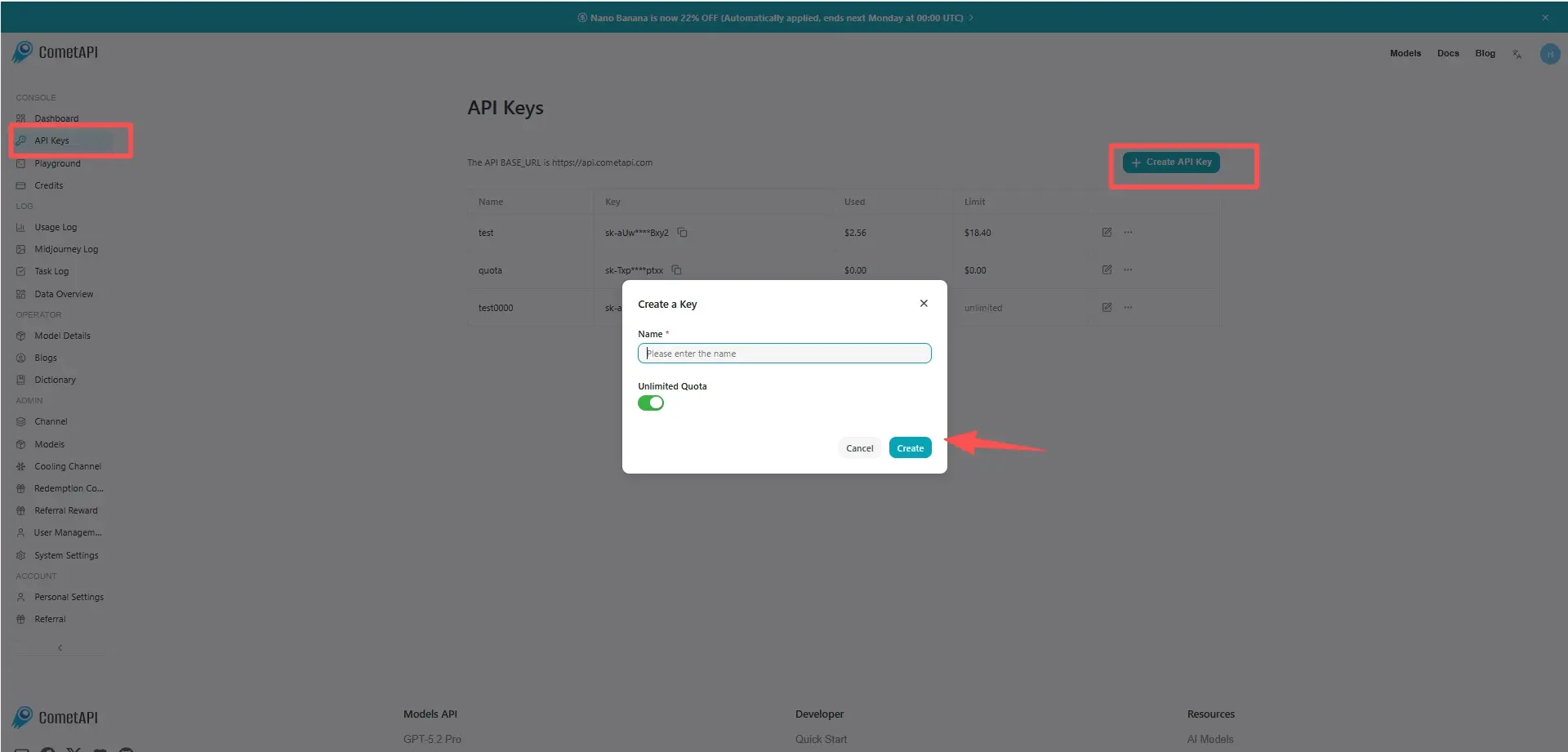
Step 1: Get API Access
Log in to cometAPI. If you are not our user yet, please register first. Sign into your CometAPI console. Get the access credential API key of the interface. Click “Add Token” at the API token in the personal center, get the token key: sk-xxxxx and submit.
Step 2: Send Requests to qwen3.8-flash API
Select the “qwen3.8-flash” endpoint to send the API request and set the request body. The request method and request body are obtained from our website API doc. Our website also provides Apifox test for your convenience. Replace <YOUR_API_KEY> with your actual CometAPI key from your account.
Insert your question or request into the content field—this is what the model will respond to . Process the API response to get the generated answer. It supports AI SDK, OpenAI Chat Completions, OpenAI Responses and Anthropic Messages-compatible interfaces.
Step 3: Process Responses
The API returns structured candidate responses including generated text, citations, safety metadata, and optional tool outputs. For multimodal requests, the message content can be structured with text and image inputs when the selected CometAPI endpoint exposes the model's vision capability.