Basic features (what Claude Sonnet 3.5 gives you)
- Strong reasoning & instruction following: tuned for multi-step logical tasks and document Q&A.
- Agent & tool use: built to make robust tool-calls and orchestration for agentic workflows (e.g., tool selection, error correction). Anthropic added a public-beta computer-use capability allowing Claude to interact with a GUI (cursor, clicks, typing) in a “flipbook” view. This is experimental but notable for automating GUI tasks.
- Strong coding ability: competitive HumanEval / SWE-bench performance (see Benchmarks).
- Managed safety & privacy controls: Anthropic continues to emphasize safety-first training and safer defaults across Claude models.
- <img height="756" width="1356" alt="testalt" title="testtitle" src="https://resource.cometapi.com/eca6fbc7-8437-4a00-a190-9114a550f649.png" />
Technical details of Claude 3.5 Sonnet
- Multimodal: handles text + images (vision APIs that accept base64 or URL images), including charts/graphs and visual question answering.
- Long context: published context window of ~200k tokens for long documents and multi-file analysis.
- Stronger reasoning & coding than prior mid-tier models: targeted gains on developer-facing benchmarks (see Benchmarks).
- Tooling / agent support: Messages API supports tool-use patterns (code execution, web-fetch, “computer use” style agents) and structured JSON outputs for robust integrations.
- Safety-first training approach: built with Anthropic’s Constitutional AI principles and additional classifier/safeguard techniques.
Benchmark performance of Claude 3.5 Sonnet
Benchmarks vary by prompt style, shot count, and exact model snapshot. Below are representative, widely-cited public figures (all sources link to the vendor or public benchmark pages):
- BIG-Bench-Hard (3-shot CoT / Sonnet reporting): ~93.1% — indicating very strong multi-step reasoning performance on the BIG-Bench-Hard suite as reported in vendor/partner listings.
- HumanEval (code correctness): ~93–94% (reported top-class HumanEval scores for Sonnet in Anthropic/GitHub Copilot materials). This places Sonnet among the highest performers on standard program-synthesis code tests.
- SWE-bench (agentic coding / GitHub issue solving, “Verified”): ~49% (Sonnet improved substantially versus prior releases on SWE-bench Verified tasks). Note: SWE-bench focuses on real-world GitHub issue resolution and is sensitive to prompt style and environment/tooling.
Caveats about benchmarks: vendors and third-party evaluators use different prompt templates, shot settings, and evaluation filters. Use these numbers as comparative signals rather than absolute guarantees for specific production tasks.
Limitations & known risks of Claude 3.5 Sonnet
- Hallucinations / factual errors: Sonnet reduces some failure modes versus older models but still produces incorrect or hallucinated facts, especially on niche or extremely recent facts. Use retrieval/RAG and verification for high-stakes outputs.
- Experimental features: the computer-use capability was released in public beta and is still error-prone (it observes the screen as a flipbook; short-lived UI events can be missed). Don’t rely on it for safety-critical or tightly timed GUI operations without robust monitoring.
- Bias & safety guardrails: Sonnet inherits Anthropic’s safety-oriented fine-tuning. That reduces many unsafe outputs but can mean conservative refusals or filtered answers in ambiguous cases.
- Operational limits: token limits, rate limits, pricing tiers and regional availability vary by platform (Anthropic direct, Bedrock, Vertex AI). Pin versions and review platform quotas before production rollout.
Comparison with gpt 4o and Claude 4
(Comparisons are approximate and depend on exact snapshots; numbers below summarize public comparative claims.)
- vs GPT-4 / GPT-4o (OpenAI): Sonnet often reports higher scores on multi-step reasoning and code correctness benchmarks (e.g., HumanEval / BIG-Bench variants in vendor materials), while GPT variants remain competitive on math & chain-of-thought tasks and in tooling (and may have different latency/cost trade-offs). Empirical comparisons vary by benchmark.
- vs Anthropic’s own Opus / Claude 4: Opus / Claude 4 (and later Sonnet snapshots) may outperform Sonnet on the most complex, compute-intensive tasks; Sonnet remains attractive for agentic workflows requiring cost/latency balance.
Recommendation: run short, domain-specific A/B tests (same prompts, pinned model versions) rather than relying only on public leaderboards; real application utility is task-specific.
Representative production use cases
- Agentic automation: tool orchestration, ticket triage, structured tool calls and automated GUI tasks (with monitoring).
- Software engineering & code assistance: code generation, transformation, migration, PR summarization, debugging suggestions — Sonnet’s SWE-bench / HumanEval strength makes it a strong choice for coding assistants.
- Document Q&A & summarization: deeper context understanding for contracts, research reports, and long documents (pair with retrieval).
- Data extraction from visuals: Sonnet has been used for extracting/understanding chart/table content where platforms permit image inputs.
How to access Claude Sonnet 3.5 API
Step 1: Sign Up for API Key
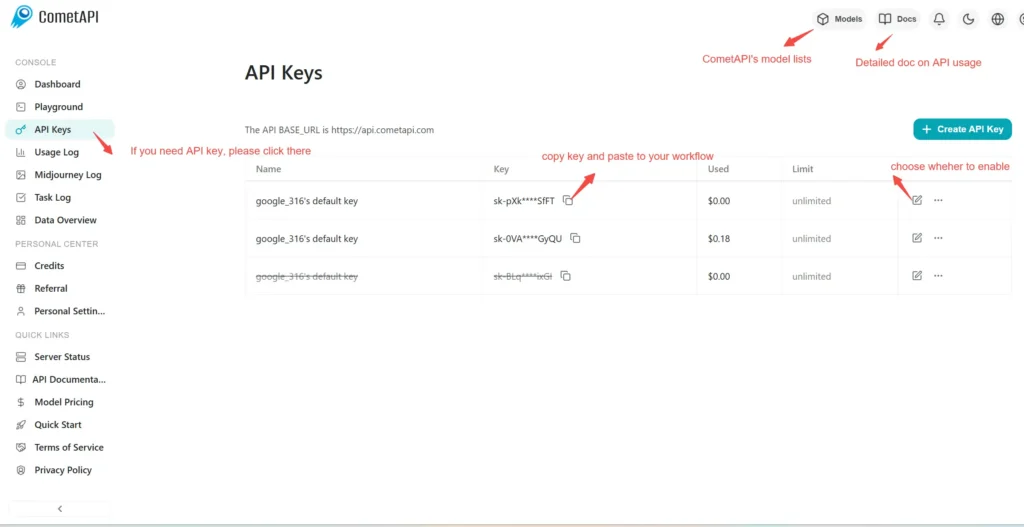
Log in to cometapi.com. If you are not our user yet, please register first. Sign into your CometAPI console. Get the access credential API key of the interface. Click “Add Token” at the API token in the personal center, get the token key: sk-xxxxx and submit.
Step 2: Send Requests to Claude Opus 4.1
Select the “claude-3-5-sonnet-20241022” endpoint to send the API request and set the request body. The request method and request body are obtained from our website API doc. Our website also provides Apifox test for your convenience. Replace <YOUR_API_KEY> with your actual CometAPI key from your account. base url is Anthropic Messages format and Chat format.
Insert your question or request into the content field—this is what the model will respond to . Process the API response to get the generated answer.
Step 3: Retrieve and Verify Results
Process the API response to get the generated answer. After processing, the API responds with the task status and output data.