Home/Models/Google/Veo 3.1 Pro
G

Veo 3.1 Pro

Per Request:$2
Veo 3.1-Pro refers to the high-capability access/configuration of Google’s Veo 3.1 family — a generation of short-form, audio-enabled video models that add richer native audio, improved narrative/editing controls and scene-extension tools.
New
Commercial Use
Playground
Overview
Features
Pricing
API
Versions

Veo 3.1-Pro refers to the high-capability access/configuration of Google’s Veo 3.1 family — a generation of short-form, audio-enabled video models that add richer native audio, improved narrative/editing controls and scene-extension tools; the “Pro” label is commonly used to indicate higher access or quality tiers in Google’s subscription and product ecosystem rather than to denote a radically different public architecture.

How to access Veo 3.1 Pro API

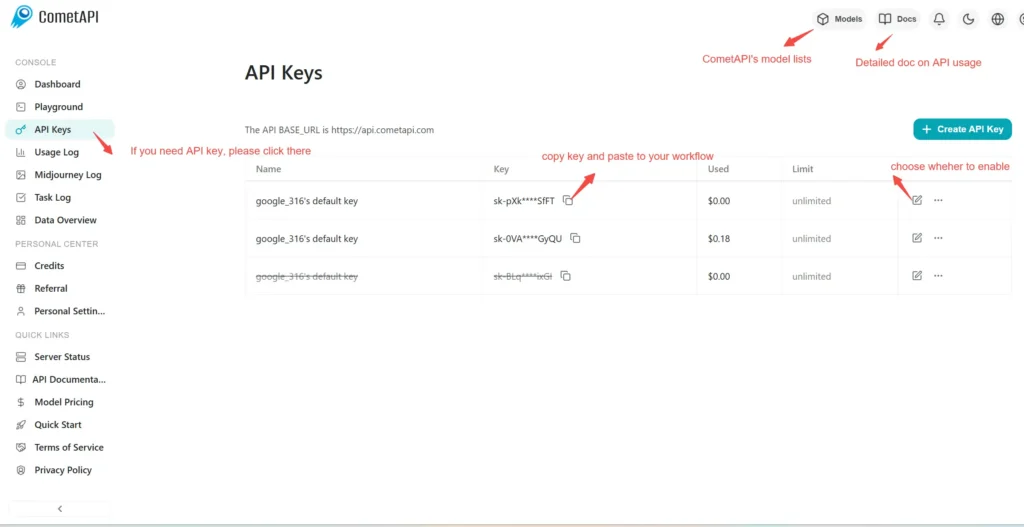
Step 1: Sign Up for API Key

Log in to cometapi.com. If you are not our user yet, please register first. Sign into your CometAPI console. Get the access credential API key of the interface. Click “Add Token” at the API token in the personal center, get the token key: sk-xxxxx and submit.
img

Step 2: Send Requests to Veo 3 Pro API

Select the “\veo3.1-pro \” endpoint to send the API request and set the request body. The request method and request body are obtained from our website API doc. Our website also provides Apifox test for your convenience. Replace <YOUR_API_KEY> with your actual CometAPI key from your account. base url is Veo3 Async Generation(https://api.cometapi.com/v1/videos).

Insert your question or request into the content field—this is what the model will respond to . Process the API response to get the generated answer.

Step 3: Retrieve and Verify Results

Process the API response to get the generated answer. After processing, the API responds with the task status and output data.

To learn more about Veo3.1, please see the Veo3.1 page.

Features for Veo 3.1 Pro

Explore the key features of Veo 3.1 Pro, designed to enhance performance and usability. Discover how these capabilities can benefit your projects and improve user experience.

Pricing for Veo 3.1 Pro

Explore competitive pricing for Veo 3.1 Pro, designed to fit various budgets and usage needs. Our flexible plans ensure you only pay for what you use, making it easy to scale as your requirements grow. Discover how Veo 3.1 Pro can enhance your projects while keeping costs manageable.
Comet Price (USD / M Tokens)Official Price (USD / M Tokens)Discount
Per Request:$2
Per Request:$2.5
-20%

Sample code and API for Veo 3.1 Pro

Access comprehensive sample code and API resources for Veo 3.1 Pro to streamline your integration process. Our detailed documentation provides step-by-step guidance, helping you leverage the full potential of Veo 3.1 Pro in your projects.
Python
Curl
import os
import time
import requests

# Get your CometAPI key from https://api.cometapi.com/console/token, and paste it here
COMETAPI_KEY = os.environ.get("COMETAPI_KEY") or "<YOUR_COMETAPI_KEY>"
BASE_URL = "https://api.cometapi.com/veo/v1/video"

# Create video generation task
create_response = requests.post(
    f"{BASE_URL}/create",
    headers={
        "Authorization": COMETAPI_KEY,
        "Content-Type": "application/json",
    },
    json={
        "prompt": "An orange cat flying in the blue sky with white clouds, sunlight pouring onto its fur, creating a beautiful and dreamlike scene",
        "model": "veo3.1-pro",
        "enhance_prompt": True,
    },
)

task = create_response.json()
task_id = task["id"]
print(f"Task created: {task_id}")
print(f"Status: {task['status']}")

# Poll until video is ready
while True:
    query_response = requests.get(
        f"{BASE_URL}/query/{task_id}",
        headers={
            "Authorization": f"Bearer {COMETAPI_KEY}",
        },
    )

    result = query_response.json()
    status = result["data"]["status"]
    progress = result["data"].get("progress", "")

    print(f"Checking status... {status} {progress}")

    if status == "SUCCESS" or result["data"]["data"]["status"] == "completed":
        video_url = result["data"]["data"]["video_url"]
        print(f"
Video URL: {video_url}")
        break
    elif status == "FAILED":
        print(f"Failed: {result['data'].get('fail_reason', 'Unknown error')}")
        break

    time.sleep(10)

Versions of Veo 3.1 Pro

The reason Veo 3.1 Pro has multiple snapshots may include potential factors such as variations in output after updates requiring older snapshots for consistency, providing developers a transition period for adaptation and migration, and different snapshots corresponding to global or regional endpoints to optimize user experience. For detailed differences between versions, please refer to the official documentation.
version
veo3.1-pro

More Models