Unlock exclusive introductory pricing for the newly launched Gemini 3.5 Flash.
O

Sora 2 Pro

Per Second:$0.24
Released:Oct 9, 2025

Sora 2 Pro is our most advanced and powerful media generation model, capable of generating videos with synchronized Audio. It can create detailed, dynamic video clips from natural language or images.

New
Commercial Use

Playground for Sora 2 Pro

Explore Sora 2 Pro's Playground โ€” an interactive environment to test models, run queries in real time. Try prompts, adjust parameters, and iterate instantly to accelerate development and validate use cases.

Key features

  • Multimodal generation (video + audio) โ€” Sora-2-Pro generates video frames together with synchronized audio (dialogue, ambient sound, SFX) rather than producing video and audio separately.
  • Higher fidelity / โ€œProโ€ tier โ€” tuned for higher visual fidelity, tougher shots (complex motion, occlusion, and physical interactions), and longer per-scene consistency than Sora-2 (non-Pro). It may take longer to render than the standard Sora-2 model.
  • Input versatility โ€” supports pure text prompts, and can accept image input frames or reference images to guide composition (input_reference workflows).
  • Cameos / likeness injection โ€” can insert a userโ€™s captured likeness into generated scenes with consent workflows in the app.
  • Physical plausibility: improved object permanence and motion fidelity (e.g., momentum, buoyancy), reducing unrealistic โ€œteleportingโ€ artifacts common in earlier systems.
  • Controllability: supports structured prompts and shot-level directions so creators can specify camera, lighting, and multi-shot sequences.

Technical details & integration surface

Model family: Sora 2 (base) and Sora 2 Pro (high-quality variant).
Input modalities: text prompts, image reference, and short recorded cameo-video/audio for likeness.
Output modalities: encoded video (with audio) โ€” parameters exposed through /v1/videos endpoints (model selection via model: "sora-2-pro"). API surface follows OpenAIโ€™s videos endpoint family for create/retrieve/list/delete operations.

Training & architecture (public summary): OpenAI describes Sora 2 as trained on large-scale video data with post-training to improve world simulation; specifics (model size, exact datasets, and tokenization) are not publicly enumerated in line-by-line detail. Expect heavy compute, specialized video tokenizers/architectures and multi-modal alignment components.


API endpoints & workflow: show a job-based workflow: submit a POST creation request (model="sora-2-pro"), receive a job id or location, then poll or wait for completion and download the resulting file(s). Common parameters in published examples include prompt, seconds/duration, size/resolution, and input_reference for image-guided starts.

Typical parameters :

  • model: "sora-2-pro"
  • prompt: natural language scene description, optionally with dialogue cues
  • seconds / duration: target clip length ( Pro supports the highest quality in available durations)
  • size / resolution: community reports indicate Pro supports up to 1080p in many use cases.

Content inputs: image files (JPEG/PNG/WEBP) can be supplied as a frame or reference; when used, the image should match the target resolution and act as a composition anchor.

Rendering behavior: Pro is tuned to prioritize frame-to-frame coherence and realistic physics; this typically implies longer compute time and higher cost per clip than non-Pro variants.

Benchmark performance

Qualitative strengths: OpenAI improved realism, physics consistency, and synchronized audio** versus prior video models. Other VBench results indicate Sora-2 and derivatives sit at or near the top of contemporary closed-source and temporal coherence.

Independent timing/throughput (example bench): Sora-2-Pro averaged ~2.1 minutes for 20-second 1080p clips in one comparison, while a competitor (Runway Gen-3 Alpha Turbo) was faster (~1.7 minutes) on the same task โ€” tradeoffs are quality vs render latency and platform optimization.

Limitations (practical & safety)

  • Not perfect physics/consistency โ€” improved but not flawless; artifacts, unnatural motion, or audio sync errors can still occur.
  • Duration & compute constraints โ€” long clips are compute-intensive; many practical workflows limit clips to short durations (e.g., single-digit to low-tens of seconds for high-quality outputs).
  • Privacy / consent risks โ€” likeness injection (โ€œcameosโ€) raises consent and mis-/disinformation risks; OpenAI has explicit safety controls and revocation mechanisms in the app, but responsible integration is required.
  • Cost & latency โ€” Pro-quality renders can be more expensive and slower than lighter models or competitors; factor in per-second/per-render billing and queuing.
  • Safety content filtering โ€” generation of harmful or copyrighted content is restricted; the model and platform include safety layers and moderation.

Use cases:

  • Marketing & ads prototypes โ€” rapidly create cinematic proofs of concept.
  • Previsualization โ€” storyboards, camera blocking, shot visualization.
  • Short social content โ€” stylized clips with synchronized dialogue and SFX.
  • How to access Sora 2 Pro API

Step 1: Sign Up for API Key

Log in to cometapi.com. If you are not our user yet, please register first. Sign into your CometAPI console. Get the access credential API key of the interface. Click โ€œAdd Tokenโ€ at the API token in the personal center, get the token key: sk-xxxxx and submit.
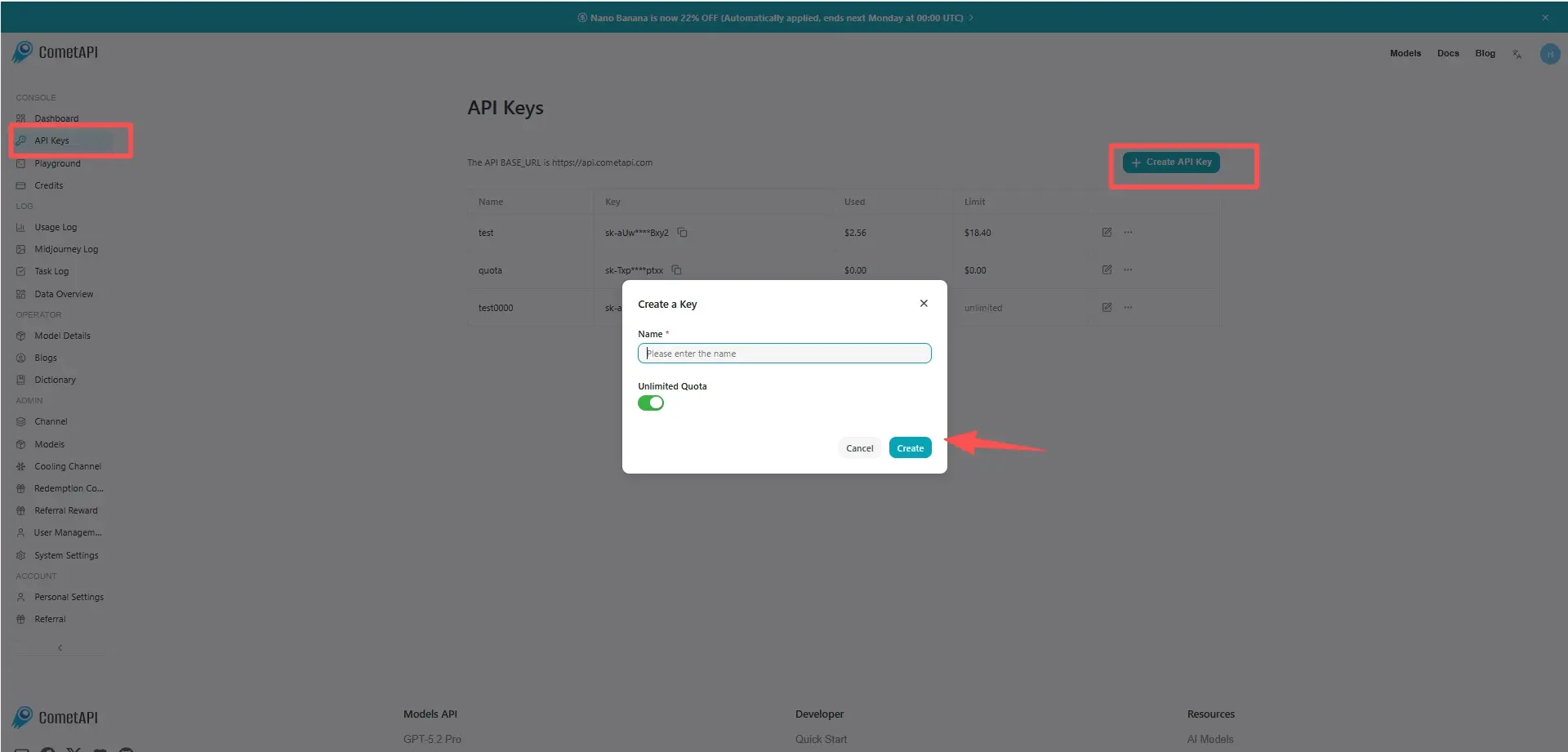
cometapi-key

Step 2: Send Requests to Sora 2 Pro API

Select the โ€œsora-2-proโ€ endpoint to send the API request and set the request body. The request method and request body are obtained from our website API doc. Our website also provides Apifox test for your convenience. Replace <YOUR_API_KEY> with your actual CometAPI key from your account. base url is office Create video

Insert your question or request into the content fieldโ€”this is what the model will respond to . Process the API response to get the generated answer.

Step 3: Retrieve and Verify Results

Process the API response to get the generated answer. After processing, the API responds with the task status and output data.

  • Internal training / simulation โ€” generate scenario visuals for RL or robotics research (with care).
  • Creative production โ€” when combined with human editing (stitching short clips, grade, replace audio).

FAQ

Pricing for Sora 2 Pro

Explore competitive pricing for Sora 2 Pro, designed to fit various budgets and usage needs. Our flexible plans ensure you only pay for what you use, making it easy to scale as your requirements grow. Discover how Sora 2 Pro can enhance your projects while keeping costs manageable.

Model NameTagsOrientationResolutionPrice
sora-2-provideosPortrait720x1280$0.24 / sec
sora-2-provideosLandscape1280x720$0.24 / sec
sora-2-provideosPortrait (High Res)1024x1792$0.40 / sec
sora-2-provideosLandscape (High Res)1792x1024$0.40 / sec
sora-2-pro-all-Universal / All-$0.80000

Sample code and API for Sora 2 Pro

Sora-2-pro is OpenAIโ€™s flagship video+audio generation model designed to create short, highly realistic video clips with synchronized dialogue, sound effects, and stronger physical/world simulation than previous video models. Itโ€™s positioned as the higher-quality โ€œProโ€ variant available to paying users and via the API for programmatic generation. The model emphasizes controllability, temporal coherence, and audio synchronization for cinematic and social use cases.

# Create a video with sora-2-pro
# Step 1: Submit the video generation request
echo "Submitting video generation request..."
response=$(curl -s https://api.cometapi.com/v1/videos \
  -H "Authorization: Bearer $COMETAPI_KEY" \
  -F "model=sora-2-pro" \
  -F "prompt=A calico cat playing a piano on stage")

echo "Response: $response"

# Extract video_id from response (handle JSON with spaces like "id": "xxx")
video_id=$(echo "$response" | tr -d '
' | sed 's/.*"id"[[:space:]]*:[[:space:]]*"\([^"]*\)".*/\1/')
echo "Video ID: $video_id"

# Step 2: Poll for progress until 100%
echo ""
echo "Checking video generation progress..."
while true; do
  status_response=$(curl -s "https://api.cometapi.com/v1/videos/$video_id" \
    -H "Authorization: Bearer $COMETAPI_KEY")

  # Parse progress from "progress": "0%" format
  progress=$(echo "$status_response" | grep -o '"progress":"[^"]*"' | head -1 | sed 's/"progress":"//;s/"$//')
  # Parse status from the outer level
  status=$(echo "$status_response" | grep -o '"status":"[^"]*"' | head -1 | sed 's/"status":"//;s/"$//')

  echo "Progress: $progress, Status: $status"

  if [ "$progress" = "100%" ]; then
    echo "Video generation completed!"
    break
  fi

  if [ "$status" = "FAILURE" ] || [ "$status" = "failed" ]; then
    echo "Video generation failed!"
    echo "$status_response"
    exit 1
  fi

  sleep 10
done

# Step 3: Download the video to output directory
echo ""
echo "Downloading video to ./output/$video_id.mp4..."
mkdir -p ./output
curl -s "https://api.cometapi.com/v1/videos/$video_id/content" \
  -H "Authorization: Bearer $COMETAPI_KEY" \
  -o "./output/$video_id.mp4"

if [ -f "./output/$video_id.mp4" ]; then
  echo "Video saved to ./output/$video_id.mp4"
  ls -la "./output/$video_id.mp4"
else
  echo "Failed to download video"
  exit 1
fi

cURL Code Example

# Create a video with sora-2-pro
# Step 1: Submit the video generation request
echo "Submitting video generation request..."
response=$(curl -s https://api.cometapi.com/v1/videos \
  -H "Authorization: Bearer $COMETAPI_KEY" \
  -F "model=sora-2-pro" \
  -F "prompt=A calico cat playing a piano on stage")

echo "Response: $response"

# Extract video_id from response (handle JSON with spaces like "id": "xxx")
video_id=$(echo "$response" | tr -d '\n' | sed 's/.*"id"[[:space:]]*:[[:space:]]*"\([^"]*\)".*/\1/')
echo "Video ID: $video_id"

# Step 2: Poll for progress until 100%
echo ""
echo "Checking video generation progress..."
while true; do
  status_response=$(curl -s "https://api.cometapi.com/v1/videos/$video_id" \
    -H "Authorization: Bearer $COMETAPI_KEY")
  
  # Parse progress from "progress": "0%" format
  progress=$(echo "$status_response" | grep -o '"progress":"[^"]*"' | head -1 | sed 's/"progress":"//;s/"$//')
  # Parse status from the outer level
  status=$(echo "$status_response" | grep -o '"status":"[^"]*"' | head -1 | sed 's/"status":"//;s/"$//')
  
  echo "Progress: $progress, Status: $status"
  
  if [ "$progress" = "100%" ]; then
    echo "Video generation completed!"
    break
  fi
  
  if [ "$status" = "FAILURE" ] || [ "$status" = "failed" ]; then
    echo "Video generation failed!"
    echo "$status_response"
    exit 1
  fi
  
  sleep 10
done

# Step 3: Download the video to output directory
echo ""
echo "Downloading video to ./output/$video_id.mp4..."
mkdir -p ./output
curl -s "https://api.cometapi.com/v1/videos/$video_id/content" \
  -H "Authorization: Bearer $COMETAPI_KEY" \
  -o "./output/$video_id.mp4"

if [ -f "./output/$video_id.mp4" ]; then
  echo "Video saved to ./output/$video_id.mp4"
  ls -la "./output/$video_id.mp4"
else
  echo "Failed to download video"
  exit 1
fi

Python Code Example

# Create a video with sora-2-pro using raw HTTP requests
import os
import time
import requests

api_key = os.environ.get("COMETAPI_KEY")
base_url = "https://api.cometapi.com/v1"

headers = {"Authorization": f"Bearer {api_key}"}

# Step 1: Submit the video generation request
print("Submitting video generation request...")
response = requests.post(
    f"{base_url}/videos",
    headers=headers,
    files={
        "model": (None, "sora-2-pro"),
        "prompt": (None, "A calico cat playing a piano on stage"),
    },
)

result = response.json()
print(f"Response: {result}")

video_id = result.get("id")
print(f"Video ID: {video_id}")

# Step 2: Poll for progress until 100%
print("\nChecking video generation progress...")
while True:
    try:
        status_response = requests.get(f"{base_url}/videos/{video_id}", headers=headers)
        status_result = status_response.json()

        # Parse progress and status from response
        data = status_result.get("data", {})
        if data is None:
            data = {}
        progress = data.get("progress", "0%")
        status = data.get("status", "unknown")

        print(f"Progress: {progress}, Status: {status}")

        if status in ["FAILURE", "failed"]:
            print("Video generation failed!")
            print(status_result)
            exit(1)

        if progress == "100%":
            print("Video generation completed!")
            break
    except Exception as e:
        print(f"Temporary error: {e}, retrying...")

    time.sleep(10)

# Step 3: Download the video to output directory
print(f"\nDownloading video to ./output/{video_id}.mp4...")
os.makedirs("./output", exist_ok=True)

video_response = requests.get(f"{base_url}/videos/{video_id}/content", headers=headers)

output_path = f"./output/{video_id}.mp4"
with open(output_path, "wb") as f:
    f.write(video_response.content)

if os.path.exists(output_path):
    file_size = os.path.getsize(output_path)
    print(f"Video saved to {output_path}")
    print(f"File size: {file_size} bytes")
else:
    print("Failed to download video")
    exit(1)

JavaScript Code Example

// Create a video with sora-2-pro using raw HTTP requests
import fs from "fs";
import path from "path";

const apiKey = process.env.COMETAPI_KEY;
const baseUrl = "https://api.cometapi.com/v1";

async function sleep(ms) {
  return new Promise((resolve) => setTimeout(resolve, ms));
}

async function main() {
  // Step 1: Submit the video generation request
  console.log("Submitting video generation request...");

  const formData = new FormData();
  formData.append("model", "sora-2-pro");
  formData.append("prompt", "A calico cat playing a piano on stage");

  const submitResponse = await fetch(`${baseUrl}/videos`, {
    method: "POST",
    headers: {
      Authorization: `Bearer ${apiKey}`,
    },
    body: formData,
  });

  const result = await submitResponse.json();
  console.log("Response:", JSON.stringify(result, null, 2));

  const videoId = result.id;
  console.log("Video ID:", videoId);

  // Step 2: Poll for progress until 100%
  console.log("\nChecking video generation progress...");

  while (true) {
    try {
      const statusResponse = await fetch(`${baseUrl}/videos/${videoId}`, {
        headers: {
          Authorization: `Bearer ${apiKey}`,
        },
      });

      const text = await statusResponse.text();
      if (text.startsWith("<")) {
        console.log("Temporary server error, retrying...");
        await sleep(10000);
        continue;
      }

      const statusResult = JSON.parse(text);

      // Parse progress and status from response
      const data = statusResult.data || {};
      const progress = data.progress || "0%";
      const status = data.status || "unknown";

      console.log(`Progress: ${progress}, Status: ${status}`);

      if (status === "FAILURE" || status === "failed") {
        console.log("Video generation failed!");
        console.log(JSON.stringify(statusResult, null, 2));
        process.exit(1);
      }

      if (progress === "100%") {
        console.log("Video generation completed!");
        break;
      }
    } catch (e) {
      console.log(`Temporary error: ${e.message}, retrying...`);
    }

    await sleep(10000);
  }

  // Step 3: Download the video to output directory
  console.log(`\nDownloading video to ./output/${videoId}.mp4...`);

  const outputDir = "./output";
  if (!fs.existsSync(outputDir)) {
    fs.mkdirSync(outputDir, { recursive: true });
  }

  const videoResponse = await fetch(`${baseUrl}/videos/${videoId}/content`, {
    headers: {
      Authorization: `Bearer ${apiKey}`,
    },
  });

  const outputPath = path.join(outputDir, `${videoId}.mp4`);
  const videoBuffer = Buffer.from(await videoResponse.arrayBuffer());
  fs.writeFileSync(outputPath, videoBuffer);

  if (fs.existsSync(outputPath)) {
    const stats = fs.statSync(outputPath);
    console.log(`Video saved to ${outputPath}`);
    console.log(`File size: ${stats.size} bytes`);
  } else {
    console.log("Failed to download video");
    process.exit(1);
  }
}

main().catch(console.error);