What is FLUX.2 [flex]
FLUX.2 [flex] is the “flexible-control” variant in Black Forest Labs’ FLUX.2 family: a production-minded text→image and image-editing model that exposes tunable inference parameters (steps, guidance scale, seed) so developers trade speed for fidelity and dial typography / fine-detail behavior precisely. Flex supports multi-reference editing (up to 10 reference images in the Flex tier), edits up to ~4 megapixels.
What FLUX.2 [flex] is good for
- Precise control over quality vs. speed (user selects inference steps and guidance scale).
- Superior text/typography rendering relative to many contemporaries — recommended for posters, UI mockups, infographics.
- Multi-reference editing: combine and preserve identity/brand elements across up to 10 input images (Flex), with coherent lighting and materials.
- High native resolution & editing: up to 4MP output; recommended operational envelope ≤2MP for most workflows.
- Structured prompts supported: JSON or natural-language prompts; “prompt upsampling” can enrich short prompts automatically.
How FLUX.2 [flex] compares to peers
Short table (summary):
- Nano Banana Pro (Google / internal names; high-fidelity competitor): similar raw fidelity at high resolutions; Nano Banana targets larger outputs in some provider builds; user comparisons show comparable photorealism but different strengths in prompt behavior and editing consistency.
- Qwen-Image / Hunyuan Image: FLUX.2 reported stronger subjective win rates in the launch comparisons on text→image and editing multi-reference tasks (see launch coverage).
- Midjourney / Commercial SaaS: Midjourney often uses upscaling pipelines to compete on final pixel count; FLUX.2 emphasizes native high-resolution output and tighter multi-reference editing. Independent reviewers see trade-offs in compositional style and native pixel detail.
Practical takeaway: FLUX.2’s selling points are multi-reference editing, robust typography, and a family of endpoints that let teams pick a throughput/quality/cost compromise. Independent testers find it competitive with the top models in the same release window.
[flex] only parameters:
| Parameter | Type | Default | Description |
|---|---|---|---|
| steps | integer | 50 | [flex only] Number of inference steps. Maximum: 50, default: 50. Higher = more detail, slower. |
| guidance | float | 4.5 | [flex only] Guidance scale. Controls how closely the output follows the prompt. Minimum: 1.5, maximum: 10, default: 4.5. Higher = closer prompt adherence. |
How to access Flux.2 Flex API
Step 1: Sign Up for API Key
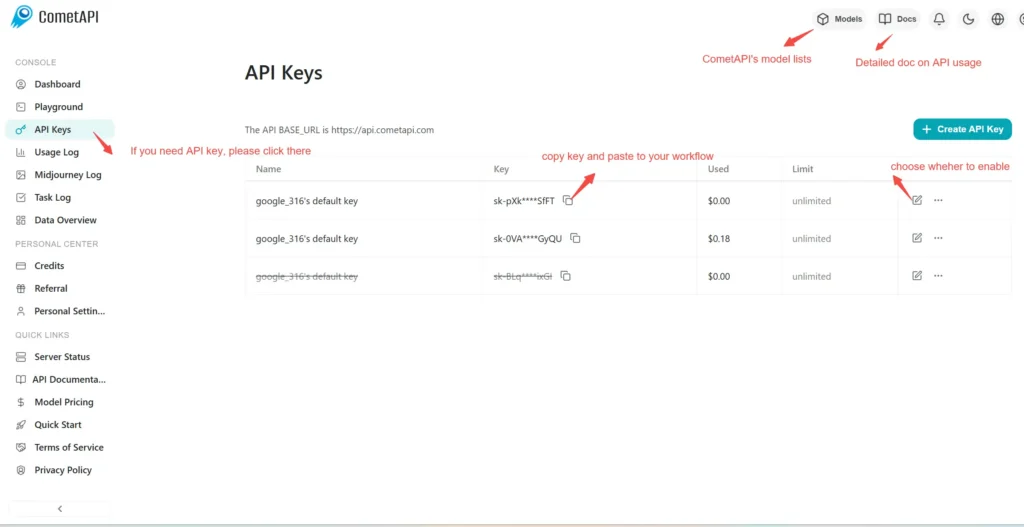
Log in to cometapi.com. If you are not our user yet, please register first. Sign into your CometAPI console. Get the access credential API key of the interface. Click “Add Token” at the API token in the personal center, get the token key: sk-xxxxx and submit.
Step 2: Send Requests to Flux.2 Flex API
Select the “flux-2-flex ”endpoint to send the API request and set the request body. The request method and request body are obtained from our website API doc. Our website also provides Apifox test for your convenience. Replace <YOUR_API_KEY> with your actual CometAPI key from your account. base url is flux generate image(https://api.cometapi.com/flux/v1/flux-2-flex)
Insert your question or request into the content field—this is what the model will respond to . Process the API response to get the generated answer.
Step 3: Retrieve and Verify Results
After generation, you can use the /flux/v1/get_result endpoint to query generated images or monitor process status.. After processing, the API responds with the task status and output data.
👇 Start Building Now Flux image generation – API Doc