Home/Models/Google/Veo 3.1 Pro
G

Veo 3.1 Pro

ต่อคำขอ:$2
Veo 3.1-Pro หมายถึงการเข้าถึง/การกำหนดค่าที่มีขีดความสามารถสูงของตระกูล Veo 3.1 ของ Google — เจเนอเรชันของโมเดลวิดีโอรูปแบบสั้นที่รองรับเสียง ซึ่งเพิ่มเสียงแบบเนทีฟที่มีความสมบูรณ์ยิ่งขึ้น การควบคุมการเล่าเรื่อง/การตัดต่อที่ได้รับการปรับปรุง และเครื่องมือสำหรับการขยายฉาก.
ใหม่
ใช้งานเชิงพาณิชย์
Playground
ภาพรวม
คุณสมบัติ
ราคา
API
เวอร์ชัน

Veo 3.1-Pro refers to the high-capability access/configuration of Google’s Veo 3.1 family — a generation of short-form, audio-enabled video models that add richer native audio, improved narrative/editing controls and scene-extension tools; the “Pro” label is commonly used to indicate higher access or quality tiers in Google’s subscription and product ecosystem rather than to denote a radically different public architecture.

How to access Veo 3.1 Pro API

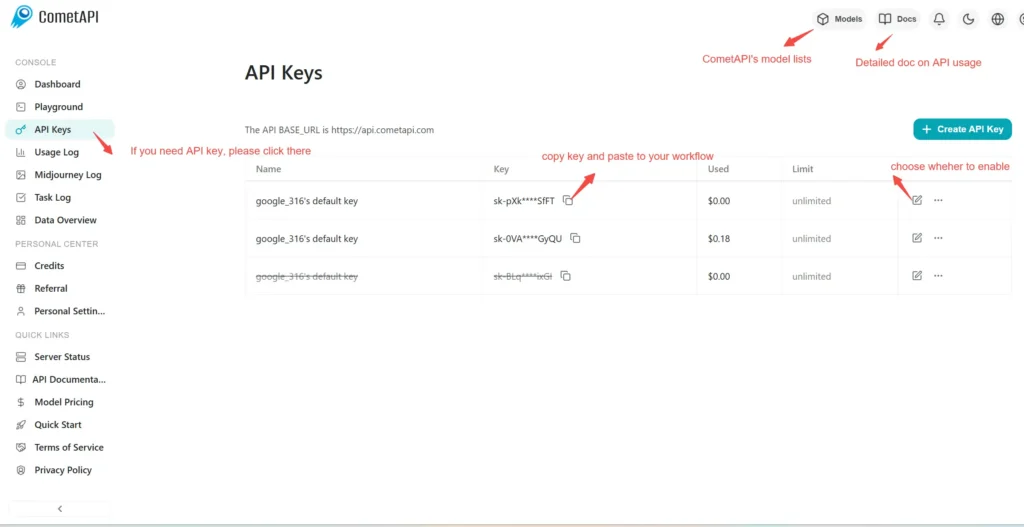
Step 1: Sign Up for API Key

Log in to cometapi.com. If you are not our user yet, please register first. Sign into your CometAPI console. Get the access credential API key of the interface. Click “Add Token” at the API token in the personal center, get the token key: sk-xxxxx and submit.
img

Step 2: Send Requests to Veo 3 Pro API

Select the “\veo3.1-pro \” endpoint to send the API request and set the request body. The request method and request body are obtained from our website API doc. Our website also provides Apifox test for your convenience. Replace <YOUR_API_KEY> with your actual CometAPI key from your account. base url is Veo3 Async Generation(https://api.cometapi.com/v1/videos).

Insert your question or request into the content field—this is what the model will respond to . Process the API response to get the generated answer.

Step 3: Retrieve and Verify Results

Process the API response to get the generated answer. After processing, the API responds with the task status and output data.

To learn more about Veo3.1, please see the Veo3.1 page.

คุณสมบัติสำหรับ Veo 3.1 Pro

สำรวจคุณสมบัติหลักของ Veo 3.1 Pro ที่ออกแบบมาเพื่อเพิ่มประสิทธิภาพและความสะดวกในการใช้งาน ค้นพบว่าความสามารถเหล่านี้สามารถเป็นประโยชน์ต่อโครงการของคุณและปรับปรุงประสบการณ์ของผู้ใช้ได้อย่างไร

ราคาสำหรับ Veo 3.1 Pro

สำรวจราคาที่แข่งขันได้สำหรับ Veo 3.1 Pro ที่ออกแบบมาให้เหมาะสมกับงบประมาณและความต้องการการใช้งานที่หลากหลาย แผนการบริการที่ยืดหยุ่นของเรารับประกันว่าคุณจะจ่ายเฉพาะสิ่งที่คุณใช้เท่านั้น ทำให้สามารถขยายขนาดได้ง่ายเมื่อความต้องการของคุณเพิ่มขึ้น ค้นพบว่า Veo 3.1 Pro สามารถยกระดับโปรเจกต์ของคุณได้อย่างไรในขณะที่ควบคุมต้นทุนให้อยู่ในระดับที่จัดการได้
ราคา Comet (USD / M Tokens)ราคาทางการ (USD / M Tokens)ส่วนลด
ต่อคำขอ:$2
ต่อคำขอ:$2.5
-20%

โค้ดตัวอย่างและ API สำหรับ Veo 3.1 Pro

เข้าถึงโค้ดตัวอย่างที่ครอบคลุมและทรัพยากร API สำหรับ Veo 3.1 Pro เพื่อปรับปรุงกระบวนการผสานรวมของคุณ เอกสารประกอบที่มีรายละเอียดของเราให้คำแนะนำทีละขั้นตอน ช่วยให้คุณใช้ประโยชน์จากศักยภาพเต็มรูปแบบของ Veo 3.1 Pro ในโครงการของคุณ
Python
Curl
import os
import time
import requests

# Get your CometAPI key from https://api.cometapi.com/console/token, and paste it here
COMETAPI_KEY = os.environ.get("COMETAPI_KEY") or "<YOUR_COMETAPI_KEY>"
BASE_URL = "https://api.cometapi.com/veo/v1/video"

# Create video generation task
create_response = requests.post(
    f"{BASE_URL}/create",
    headers={
        "Authorization": COMETAPI_KEY,
        "Content-Type": "application/json",
    },
    json={
        "prompt": "An orange cat flying in the blue sky with white clouds, sunlight pouring onto its fur, creating a beautiful and dreamlike scene",
        "model": "veo3.1-pro",
        "enhance_prompt": True,
    },
)

task = create_response.json()
task_id = task["id"]
print(f"Task created: {task_id}")
print(f"Status: {task['status']}")

# Poll until video is ready
while True:
    query_response = requests.get(
        f"{BASE_URL}/query/{task_id}",
        headers={
            "Authorization": f"Bearer {COMETAPI_KEY}",
        },
    )

    result = query_response.json()
    status = result["data"]["status"]
    progress = result["data"].get("progress", "")

    print(f"Checking status... {status} {progress}")

    if status == "SUCCESS" or result["data"]["data"]["status"] == "completed":
        video_url = result["data"]["data"]["video_url"]
        print(f"
Video URL: {video_url}")
        break
    elif status == "FAILED":
        print(f"Failed: {result['data'].get('fail_reason', 'Unknown error')}")
        break

    time.sleep(10)

รุ่นของ Veo 3.1 Pro

เหตุผลที่ Veo 3.1 Pro มีสแนปช็อตหลายตัวอาจรวมถึงปัจจัยที่อาจเกิดขึ้น เช่น ความแปรผันของผลลัพธ์หลังการอัปเดตที่ต้องการสแนปช็อตรุ่นเก่าสำหรับความสม่ำเสมอ การให้ช่วงเวลาเปลี่ยนผ่านสำหรับนักพัฒนาเพื่อการปรับตัวและการย้ายข้อมูล และสแนปช็อตที่แตกต่างกันซึ่งสอดคล้องกับเอนด์พอยต์ระดับโลกหรือระดับภูมิภาคเพื่อเพิ่มประสิทธิภาพประสบการณ์ผู้ใช้ สำหรับความแตกต่างโดยละเอียดระหว่างเวอร์ชัน โปรดอ้างอิงเอกสารทางการ
version
veo3.1-pro

โมเดลเพิ่มเติม