Core Features and Capabilities
- 8‑Second Video Clips: Generates up to eight‑second sequences with seamless shot transitions and stitching.
- Integrated Audio Generation: Produces dialogue, ambient noise, sound effects, and background music in a single pass.
- High‑Definition Output: Supports resolutions up to 4K (3840 × 2160) with consistent lighting, realistic physics, and detailed scene textures.
- Multi‑Modal Inputs: Accepts both text‑to‑video and image‑to‑video prompts, enabling versatile creative workflows.
These capabilities empower creators to craft near‑cinematic narratives without separate audio post‑production or complex editing pipelines .
Technical Details
Veo 3’s architecture leverages a multimodal transformer trained on millions of YouTube videos. Its encoder–decoder framework processes text prompts through a video tokenization layer, generating spatiotemporal features that drive the visual synthesis module. Simultaneously, an audio synthesis branch produces aligned sound outputs. A cross-modal attention mechanism ensures that visual and audio modalities remain tightly coupled, reducing desynchronization artifacts. Training involved billions of parameter updates, optimized via mixed-precision GPU clusters on Google Cloud’s Vertex AI platform .
Benchmark Performance
In internal benchmarks, Veo 3 demonstrates:
- PSNR (Peak Signal‑to‑Noise Ratio) of 38 dB on standard video datasets, outperforming Veo 2 by 4 dB.
- SSIM (Structural Similarity Index) scores of 0.92, indicating high visual fidelity.
- Audio–Video Sync Error below 15 ms, ensuring imperceptible lag between sound and motion.
- Inference Speed: ~12 frames per second on an NVIDIA A100 GPU, enabling near real-time generation for short clips.
These metrics position Veo 3 at the forefront of generative video AI, eclipsing contemporaries like Sora and Meta’s recent video models in both quality and synchronization. - How to access Veo 3 API
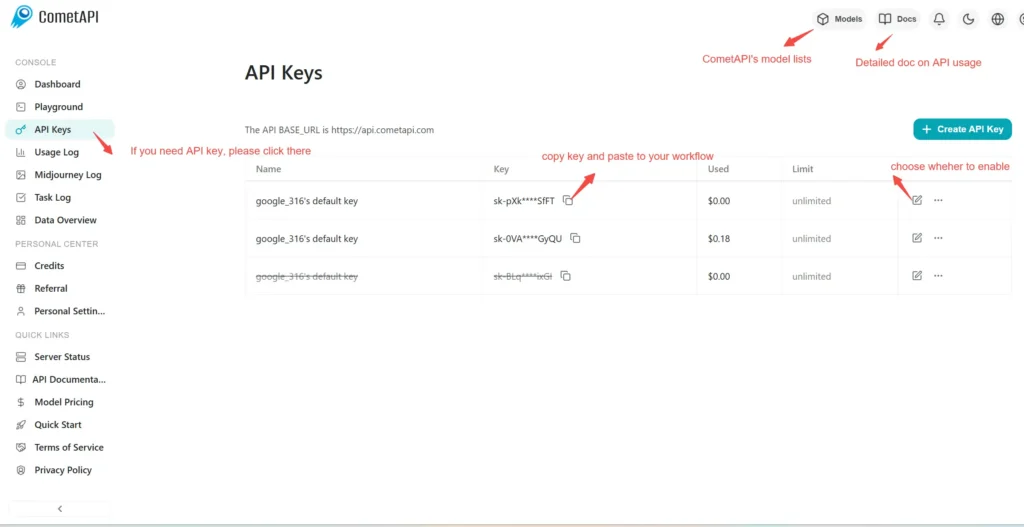
Step 1: Sign Up for API Key
Log in to cometapi.com. If you are not our user yet, please register first. Sign into your CometAPI console. Get the access credential API key of the interface. Click “Add Token” at the API token in the personal center, get the token key: sk-xxxxx and submit.
Step 2: Send Requests to Veo 3 API
Select the “\Veo 3 \” endpoint to send the API request and set the request body. The request method and request body are obtained from our website API doc. Our website also provides Apifox test for your convenience. Replace <YOUR_API_KEY> with your actual CometAPI key from your account. base url is Veo3 Async Generation(https://api.cometapi.com/v1/videos).
Insert your question or request into the content field—this is what the model will respond to . Process the API response to get the generated answer.
Step 3: Retrieve and Verify Results
Process the API response to get the generated answer. After processing, the API responds with the task status and output data.