Home/Models/Google/Veo 3.1 Pro
G

Veo 3.1 Pro

فی درخواست:$2
Veo 3.1-Pro سے مراد Google کی Veo 3.1 فیملی کی اعلیٰ صلاحیتوں والی رسائی/کنفیگریشن ہے — یہ مختصر فارمیٹ، آڈیو سے لیس ویڈیو ماڈلز کی ایک جنریشن ہے جو زیادہ بھرپور بِلٹ اِن آڈیو، بہتر بیانیہ/ایڈیٹنگ کنٹرولز اور سین ایکسٹینشن ٹولز فراہم کرتی ہے۔
نیا
تجارتی استعمال
Playground
خلاصہ
خصوصیات
قیمت
API
ورژن

Veo 3.1-Pro refers to the high-capability access/configuration of Google’s Veo 3.1 family — a generation of short-form, audio-enabled video models that add richer native audio, improved narrative/editing controls and scene-extension tools; the “Pro” label is commonly used to indicate higher access or quality tiers in Google’s subscription and product ecosystem rather than to denote a radically different public architecture.

How to access Veo 3.1 Pro API

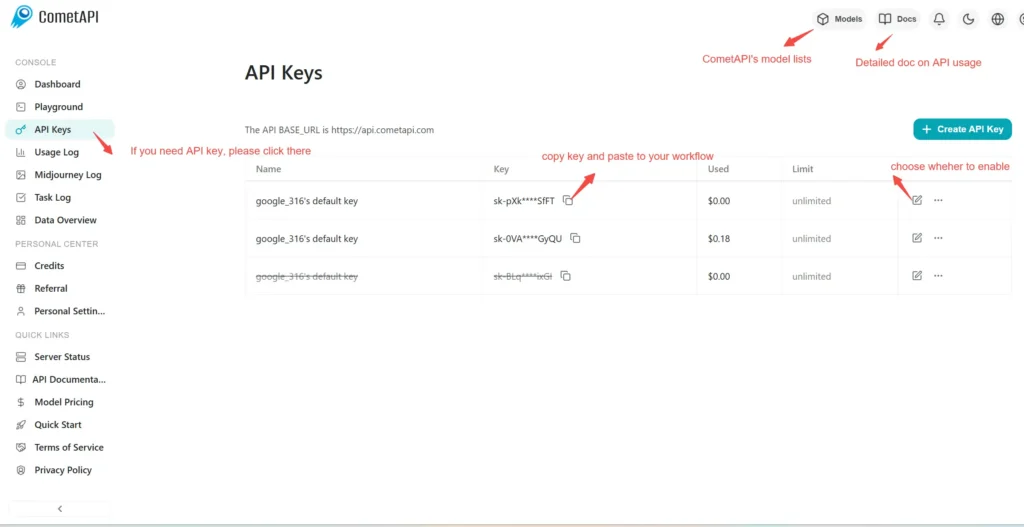
Step 1: Sign Up for API Key

Log in to cometapi.com. If you are not our user yet, please register first. Sign into your CometAPI console. Get the access credential API key of the interface. Click “Add Token” at the API token in the personal center, get the token key: sk-xxxxx and submit.
img

Step 2: Send Requests to Veo 3 Pro API

Select the “\veo3.1-pro \” endpoint to send the API request and set the request body. The request method and request body are obtained from our website API doc. Our website also provides Apifox test for your convenience. Replace <YOUR_API_KEY> with your actual CometAPI key from your account. base url is Veo3 Async Generation(https://api.cometapi.com/v1/videos).

Insert your question or request into the content field—this is what the model will respond to . Process the API response to get the generated answer.

Step 3: Retrieve and Verify Results

Process the API response to get the generated answer. After processing, the API responds with the task status and output data.

To learn more about Veo3.1, please see the Veo3.1 page.

Veo 3.1 Pro کے لیے خصوصیات

[ماڈل کا نام] کی اہم خصوصیات دریافت کریں، جو کارکردگی اور قابل استعمال کو بہتر بنانے کے لیے ڈیزائن کی گئی ہیں۔ جانیں کہ یہ صلاحیتیں آپ کے منصوبوں کو کیسے فائدہ پہنچا سکتی ہیں اور صارف کے تجربے کو بہتر بنا سکتی ہیں۔

Veo 3.1 Pro کی قیمتیں

[ماڈل کا نام] کے لیے مسابقتی قیمتوں کو دریافت کریں، جو مختلف بجٹ اور استعمال کی ضروریات کے مطابق ڈیزائن کیا گیا ہے۔ ہمارے لچکدار منصوبے اس بات کو یقینی بناتے ہیں کہ آپ صرف اسی کے لیے ادائیگی کریں جو آپ استعمال کرتے ہیں، جس سے آپ کی ضروریات بڑھنے کے ساتھ ساتھ اسکیل کرنا آسان ہو جاتا ہے۔ دریافت کریں کہ [ماڈل کا نام] کیسے آپ کے پروجیکٹس کو بہتر بنا سکتا ہے جبکہ اخراجات کو قابو میں رکھتا ہے۔
Comet قیمت (USD / M Tokens)سرکاری قیمت (USD / M Tokens)رعایت
فی درخواست:$2
فی درخواست:$2.5
-20%

Veo 3.1 Pro کے لیے نمونہ کوڈ اور API

Veo 3.1 Pro کے لیے جامع نمونہ کوڈ اور API وسائل تک رسائی حاصل کریں تاکہ آپ کے انضمام کے عمل کو آسان بنایا جا سکے۔ ہماری تفصیلی دستاویزات قدم بہ قدم رہنمائی فراہم کرتی ہیں، جو آپ کو اپنے پروجیکٹس میں Veo 3.1 Pro کی مکمل صلاحیت سے فائدہ اٹھانے میں مدد کرتی ہیں۔
Python
Curl
import os
import time
import requests

# Get your CometAPI key from https://api.cometapi.com/console/token, and paste it here
COMETAPI_KEY = os.environ.get("COMETAPI_KEY") or "<YOUR_COMETAPI_KEY>"
BASE_URL = "https://api.cometapi.com/veo/v1/video"

# Create video generation task
create_response = requests.post(
    f"{BASE_URL}/create",
    headers={
        "Authorization": COMETAPI_KEY,
        "Content-Type": "application/json",
    },
    json={
        "prompt": "An orange cat flying in the blue sky with white clouds, sunlight pouring onto its fur, creating a beautiful and dreamlike scene",
        "model": "veo3.1-pro",
        "enhance_prompt": True,
    },
)

task = create_response.json()
task_id = task["id"]
print(f"Task created: {task_id}")
print(f"Status: {task['status']}")

# Poll until video is ready
while True:
    query_response = requests.get(
        f"{BASE_URL}/query/{task_id}",
        headers={
            "Authorization": f"Bearer {COMETAPI_KEY}",
        },
    )

    result = query_response.json()
    status = result["data"]["status"]
    progress = result["data"].get("progress", "")

    print(f"Checking status... {status} {progress}")

    if status == "SUCCESS" or result["data"]["data"]["status"] == "completed":
        video_url = result["data"]["data"]["video_url"]
        print(f"
Video URL: {video_url}")
        break
    elif status == "FAILED":
        print(f"Failed: {result['data'].get('fail_reason', 'Unknown error')}")
        break

    time.sleep(10)

Veo 3.1 Pro کے ورژن

Veo 3.1 Pro کے متعدد سنیپ شاٹس کی وجوہات میں ممکنہ عوامل شامل ہوسکتے ہیں جیسے اپ ڈیٹس کے بعد آؤٹ پٹ میں تبدیلیاں جس کی وجہ سے مستقل مزاجی کے لیے پرانے سنیپ شاٹس کی ضرورت ہوتی ہے، ڈویلپرز کو ایڈاپٹیشن اور مائیگریشن کے لیے منتقلی کا وقت فراہم کرنا، اور عالمی یا علاقائی اینڈ پوائنٹس کے مطابق مختلف سنیپ شاٹس کا ہونا تاکہ صارف کے تجربے کو بہتر بنایا جاسکے۔ ورژنز کے درمیان تفصیلی فرق کے لیے براہ کرم سرکاری دستاویزات کا حوالہ دیں۔
version
veo3.1-pro

مزید ماڈلز