Home/Models/Google/Veo 3.1 Pro
G

Veo 3.1 Pro

Theo Yêu cầu:$2
Veo 3.1-Pro đề cập đến quyền truy cập/cấu hình có khả năng cao của dòng Veo 3.1 của Google — một thế hệ mô hình video dạng ngắn, có hỗ trợ âm thanh, bổ sung âm thanh gốc phong phú hơn, các điều khiển tường thuật/chỉnh sửa được cải thiện và các công cụ mở rộng cảnh.
Mới
Sử dụng thương mại
Playground
Tổng quan
Tính năng
Giá cả
API
Phiên bản

Veo 3.1-Pro refers to the high-capability access/configuration of Google’s Veo 3.1 family — a generation of short-form, audio-enabled video models that add richer native audio, improved narrative/editing controls and scene-extension tools; the “Pro” label is commonly used to indicate higher access or quality tiers in Google’s subscription and product ecosystem rather than to denote a radically different public architecture.

How to access Veo 3.1 Pro API

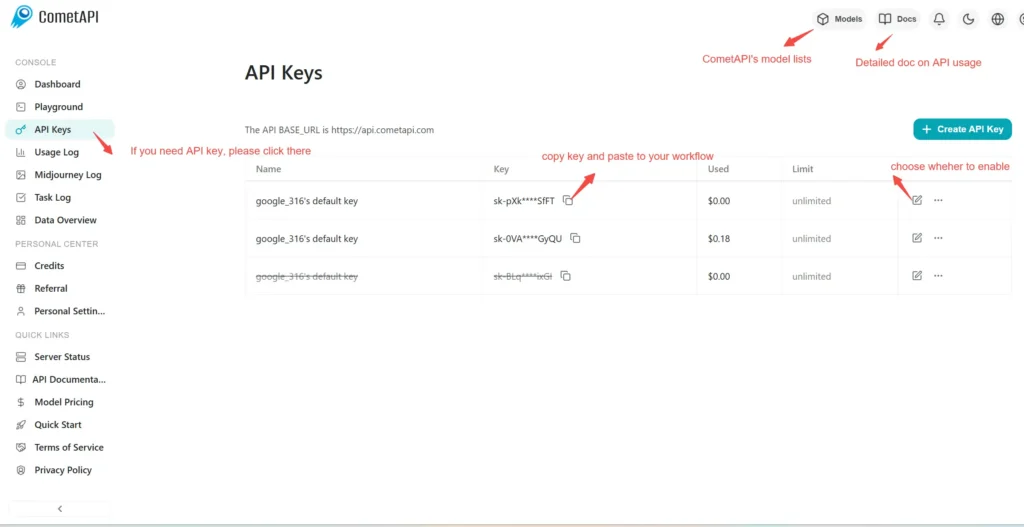
Step 1: Sign Up for API Key

Log in to cometapi.com. If you are not our user yet, please register first. Sign into your CometAPI console. Get the access credential API key of the interface. Click “Add Token” at the API token in the personal center, get the token key: sk-xxxxx and submit.
img

Step 2: Send Requests to Veo 3 Pro API

Select the “\veo3.1-pro \” endpoint to send the API request and set the request body. The request method and request body are obtained from our website API doc. Our website also provides Apifox test for your convenience. Replace <YOUR_API_KEY> with your actual CometAPI key from your account. base url is Veo3 Async Generation(https://api.cometapi.com/v1/videos).

Insert your question or request into the content field—this is what the model will respond to . Process the API response to get the generated answer.

Step 3: Retrieve and Verify Results

Process the API response to get the generated answer. After processing, the API responds with the task status and output data.

To learn more about Veo3.1, please see the Veo3.1 page.

Tính năng cho Veo 3.1 Pro

Khám phá các tính năng chính của Veo 3.1 Pro, được thiết kế để nâng cao hiệu suất và khả năng sử dụng. Tìm hiểu cách các khả năng này có thể mang lại lợi ích cho dự án của bạn và cải thiện trải nghiệm người dùng.

Giá cả cho Veo 3.1 Pro

Khám phá mức giá cạnh tranh cho Veo 3.1 Pro, được thiết kế để phù hợp với nhiều ngân sách và nhu cầu sử dụng khác nhau. Các gói linh hoạt của chúng tôi đảm bảo bạn chỉ trả tiền cho những gì bạn sử dụng, giúp dễ dàng mở rộng quy mô khi yêu cầu của bạn tăng lên. Khám phá cách Veo 3.1 Pro có thể nâng cao các dự án của bạn trong khi vẫn kiểm soát được chi phí.
Giá Comet (USD / M Tokens)Giá Chính Thức (USD / M Tokens)Giảm giá
Theo Yêu cầu:$2
Theo Yêu cầu:$2.5
-20%

Mã mẫu và API cho Veo 3.1 Pro

Truy cập mã mẫu toàn diện và tài nguyên API cho Veo 3.1 Pro để tối ưu hóa quy trình tích hợp của bạn. Tài liệu chi tiết của chúng tôi cung cấp hướng dẫn từng bước, giúp bạn khai thác toàn bộ tiềm năng của Veo 3.1 Pro trong các dự án của mình.
Python
Curl
import os
import time
import requests

# Get your CometAPI key from https://api.cometapi.com/console/token, and paste it here
COMETAPI_KEY = os.environ.get("COMETAPI_KEY") or "<YOUR_COMETAPI_KEY>"
BASE_URL = "https://api.cometapi.com/veo/v1/video"

# Create video generation task
create_response = requests.post(
    f"{BASE_URL}/create",
    headers={
        "Authorization": COMETAPI_KEY,
        "Content-Type": "application/json",
    },
    json={
        "prompt": "An orange cat flying in the blue sky with white clouds, sunlight pouring onto its fur, creating a beautiful and dreamlike scene",
        "model": "veo3.1-pro",
        "enhance_prompt": True,
    },
)

task = create_response.json()
task_id = task["id"]
print(f"Task created: {task_id}")
print(f"Status: {task['status']}")

# Poll until video is ready
while True:
    query_response = requests.get(
        f"{BASE_URL}/query/{task_id}",
        headers={
            "Authorization": f"Bearer {COMETAPI_KEY}",
        },
    )

    result = query_response.json()
    status = result["data"]["status"]
    progress = result["data"].get("progress", "")

    print(f"Checking status... {status} {progress}")

    if status == "SUCCESS" or result["data"]["data"]["status"] == "completed":
        video_url = result["data"]["data"]["video_url"]
        print(f"
Video URL: {video_url}")
        break
    elif status == "FAILED":
        print(f"Failed: {result['data'].get('fail_reason', 'Unknown error')}")
        break

    time.sleep(10)

Các phiên bản của Veo 3.1 Pro

Lý do Veo 3.1 Pro có nhiều snapshot có thể bao gồm các yếu tố tiềm năng như: sự thay đổi đầu ra sau các bản cập nhật cần các snapshot cũ để đảm bảo tính nhất quán, cung cấp cho nhà phát triển thời gian chuyển tiếp để thích ứng và di chuyển, cũng như các snapshot khác nhau tương ứng với các endpoint toàn cầu hoặc khu vực nhằm tối ưu hóa trải nghiệm người dùng. Để biết chi tiết về sự khác biệt giữa các phiên bản, vui lòng tham khảo tài liệu chính thức.
version
veo3.1-pro

Thêm mô hình