Home/Models/Google/Veo 3.1 Pro
G

Veo 3.1 Pro

每次請求:$2
Veo 3.1-Pro 指的是 Google 的 Veo 3.1 系列的高階存取/設定 — 這是一代支援音訊的短影片模型,並加入更豐富的原生音訊、改進的敘事/剪輯控制與場景延伸工具。
新
商用
Playground
概览
功能亮点
定价
API
版本

Veo 3.1-Pro refers to the high-capability access/configuration of Google’s Veo 3.1 family — a generation of short-form, audio-enabled video models that add richer native audio, improved narrative/editing controls and scene-extension tools; the “Pro” label is commonly used to indicate higher access or quality tiers in Google’s subscription and product ecosystem rather than to denote a radically different public architecture.

How to access Veo 3.1 Pro API

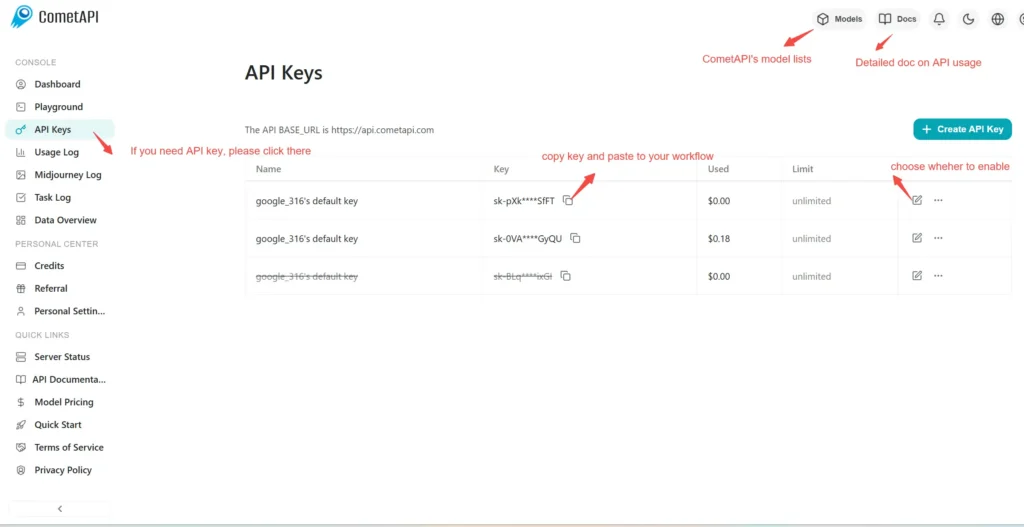
Step 1: Sign Up for API Key

Log in to cometapi.com. If you are not our user yet, please register first. Sign into your CometAPI console. Get the access credential API key of the interface. Click “Add Token” at the API token in the personal center, get the token key: sk-xxxxx and submit.
img

Step 2: Send Requests to Veo 3 Pro API

Select the “\veo3.1-pro \” endpoint to send the API request and set the request body. The request method and request body are obtained from our website API doc. Our website also provides Apifox test for your convenience. Replace <YOUR_API_KEY> with your actual CometAPI key from your account. base url is Veo3 Async Generation(https://api.cometapi.com/v1/videos).

Insert your question or request into the content field—this is what the model will respond to . Process the API response to get the generated answer.

Step 3: Retrieve and Verify Results

Process the API response to get the generated answer. After processing, the API responds with the task status and output data.

To learn more about Veo3.1, please see the Veo3.1 page.

Veo 3.1 Pro 的功能

了解 Veo 3.1 Pro 的核心能力,帮助提升性能与可用性,并改善整体体验。

Veo 3.1 Pro 的定价

查看 Veo 3.1 Pro 的竞争性定价,满足不同预算与使用需求,灵活方案确保随需求扩展。
Comet 价格 (USD / M Tokens)官方定价 (USD / M Tokens)折扣
每次請求:$2
每次請求:$2.5
-20%

Veo 3.1 Pro 的示例代码与 API

获取完整示例代码与 API 资源,简化 Veo 3.1 Pro 的集成流程,我们提供逐步指导,助你发挥模型潜能。
Python
Curl
import os
import time
import requests

# Get your CometAPI key from https://api.cometapi.com/console/token, and paste it here
COMETAPI_KEY = os.environ.get("COMETAPI_KEY") or "<YOUR_COMETAPI_KEY>"
BASE_URL = "https://api.cometapi.com/veo/v1/video"

# Create video generation task
create_response = requests.post(
    f"{BASE_URL}/create",
    headers={
        "Authorization": COMETAPI_KEY,
        "Content-Type": "application/json",
    },
    json={
        "prompt": "An orange cat flying in the blue sky with white clouds, sunlight pouring onto its fur, creating a beautiful and dreamlike scene",
        "model": "veo3.1-pro",
        "enhance_prompt": True,
    },
)

task = create_response.json()
task_id = task["id"]
print(f"Task created: {task_id}")
print(f"Status: {task['status']}")

# Poll until video is ready
while True:
    query_response = requests.get(
        f"{BASE_URL}/query/{task_id}",
        headers={
            "Authorization": f"Bearer {COMETAPI_KEY}",
        },
    )

    result = query_response.json()
    status = result["data"]["status"]
    progress = result["data"].get("progress", "")

    print(f"Checking status... {status} {progress}")

    if status == "SUCCESS" or result["data"]["data"]["status"] == "completed":
        video_url = result["data"]["data"]["video_url"]
        print(f"
Video URL: {video_url}")
        break
    elif status == "FAILED":
        print(f"Failed: {result['data'].get('fail_reason', 'Unknown error')}")
        break

    time.sleep(10)

Veo 3.1 Pro 的版本

Veo 3.1 Pro 可能存在多个快照,原因包括:更新后保持一致性需要保留旧版、给开发者留出迁移窗口,以及全球/区域端点提供的优化差异。具体差异请参考官方文档。
version
veo3.1-pro

更多模型