Veo 3 Fast is a commercial, production-grade video generation model in Google’s Veo line (DeepMind / Gemini ecosystem). It accepts text prompts (and image prompts in image→video modes), generates short, cinematic video clips with synchronized audio (speech, ambience, SFX). It is positioned to balance speed, affordability and good visual fidelity for short videos and iterations.
Main features (practical view)
- Text→video + image→video: create short videos from natural language prompts or from images plus text instructions.
- Native audio generation: speech/dialogue, ambient audio and simple SFX can be generated alongside the visual frames (no separate TTS step required).
- Fast/affordable configuration: the Fast variant is tuned for faster throughput and lower per-second cost, suitable for rapid iteration, previews and high-volume generation. Official pricing updates have significantly reduced per-second costs for both Veo 3 and Veo 3 Fast.
- Mobile-first output: vertical 9:16 support (social media ready) and 1080p output make it practical for short ads, social clips, and prototypes.
Technical capabilities & technical specification
Inputs: text prompts (primary), optional image prompts (image→video), and parameter controls (aspectRatio, resolution, frame rate, seeding). Prompts are provided through CometAPI API call interfaces.
Outputs: short video files (MP4-like outputs served by the API), with native audio (dialogue / speech, ambient sound, SFX) and optional metadata (duration, framerate).
Context / duration limits: current API limits for Veo 3 family: video length choices are limited to 4, 6 or 8 seconds. The model supports generating multiple videos per request (bounded) but the platform also enforces rate limits (e.g., max requests / min).
Resolutions & aspect ratios: supports 720p and 1080p, and both 16:9 and 9:16 (vertical) aspect ratios; framerate options include 24 FPS in preview.
Benchmark performance
Veo 3 (base / high-quality variants) generally produces more photographic detail and deeper material/physics fidelity, while Veo 3 Fast reduces latency and cost at the expense of some fine detail and the highest possible realism. For rapid A/B testing and high volume workflows, Fast frequently yields better overall cost / time efficiency.
How Veo 3 Fast compares with other models (summary)
- Veo 3 Fast vs Veo 3 (standard / “quality”): Fast is tuned for speed and cost; quality may produce marginally higher detail and fidelity for the same prompt but at higher latency and cost. For many short-form or iterative workflows, Fast hits the sweet spot; for final filmic assets, the full quality model remains preferable. (Google’s pricing and product notes explicitly position them this way.)
- Veo (3.x family) vs OpenAI Sora / other commercial video models: published comparisons (earlier Veo 2 vs competitors) show tradeoffs: Veo excels at physics-consistent scenes and integrated audio generation, whereas other models (e.g., OpenAI’s Sora family) emphasize different tradeoffs (UI/tooling, plugin ecosystems, or stylistic strengths).
How to access Veo 3 Fast API
Step 1: Sign Up for API Key
Log in to cometapi.com. If you are not our user yet, please register first. Sign into your CometAPI console. Get the access credential API key of the interface. Click “Add Token” at the API token in the personal center, get the token key: sk-xxxxx and submit.
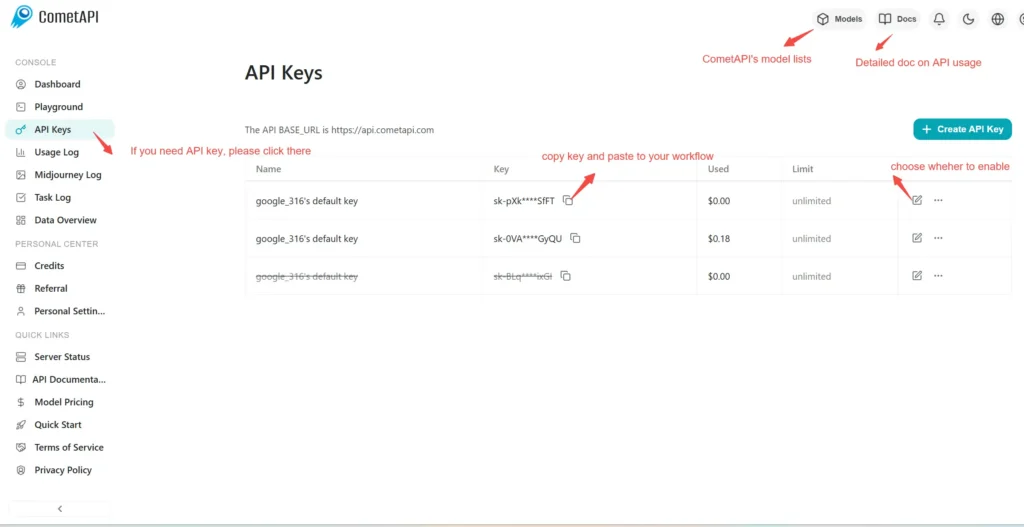
Step 2: Send Requests to Veo 3 Fast API
Select the “\veo3-fast \” endpoint to send the API request and set the request body. The request method and request body are obtained from our website API doc. Our website also provides Apifox test for your convenience. Replace <YOUR_API_KEY> with your actual CometAPI key from your account. base url is Veo3 Async Generation(https://api.cometapi.com/v1/videos).
Insert your question or request into the content field—this is what the model will respond to . Process the API response to get the generated answer.
Step 3: Retrieve and Verify Results
Process the API response to get the generated answer. After processing, the API responds with the task status and output data.