
OpenAI’s Codex represents a significant leap forward in AI-assisted software engineering, blending advanced reasoning with practical tooling to streamline development workflows. Launched in preview on May 16, 2025, Codex empowers developers to delegate complex coding tasks—ranging from feature implementation to bug fixes—to a cloud-based AI agent optimized specifically for software engineering . As of June 3, 2025, Codex has expanded availability to ChatGPT Plus users, enabling even broader access to its capabilities within the familiar ChatGPT interface . This article synthesizes the latest news and provides a step-by-step guide on using Codex effectively in your development workflow.
What is OpenAI Codex and why does it matter?
OpenAI Codex is an “agentic” AI coding assistant that operates in the cloud, powered by the codex-1 model—a specialized version of the o3 reasoning model fine-tuned for software engineering tasks. Unlike traditional autocomplete tools, Codex can autonomously execute multi-step programming requests: writing new features, analyzing and refactoring existing code, diagnosing and fixing bugs, and even proposing and managing pull requests . Each task runs in an isolated, sandboxed environment preloaded with your repository, ensuring that AI-driven changes are traceable and reproducible through terminal logs and test outputs . This level of autonomy and accountability marks a paradigm shift, as developers can now offload routine or complex coding workflows to Codex, freeing them to focus on higher-level design and architecture.
What distinguishes Codex from other AI coding tools?
Codex stands out through its agentic design: it doesn’t just suggest code snippets—it performs complete tasks end-to-end. By integrating deep code understanding with the ability to run tests, linters, and type checkers, Codex iteratively refines its outputs until they pass validation criteria. Its sandboxed execution ensures that every action is logged, enabling teams to audit and review changes easily. Furthermore, Codex supports multiple models, offering flexibility in balancing speed, creativity, and precision based on project needs.
How can you access OpenAI Codex today?
Through ChatGPT Plus
As of June 3, 2025, OpenAI expanded access to Codex to ChatGPT Plus subscribers, removing its previous exclusivity to Pro and Enterprise tiers. Plus users can now invoke Codex directly within the ChatGPT sidebar to handle coding requests in real time .
Via the Codex CLI (now in Rust)
OpenAI also offers a standalone command-line interface for Codex—originally based on Node.js/TypeScript—that was recently rewritten in Rust to boost performance and security. The Rust implementation eliminates external dependencies, accelerates startup times, and provides native safety guarantees, making it ideal for integration into CI/CD pipelines.
How can I access Codex within ChatGPT?
Accessing Codex is straightforward for eligible ChatGPT subscribers. As of early June 2025, Codex is available to ChatGPT Pro, Enterprise, Team, and Plus users through a dedicated sidebar interface .
What are the subscription requirements?
- ChatGPT Plus: Available to Plus users since June 3, 2025, enabling individual developers to experiment with agentic coding workflows.
- ChatGPT Pro/Team/Enterprise: Launched in preview on May 16, 2025, offering advanced collaboration features for organizations and larger teams.
Ensure your account is upgraded to one of these tiers; you will see the “Codex” option appear in your ChatGPT sidebar once eligibility is confirmed.
How do I enable Codex in my workspace?
- Open ChatGPT and look for the sidebar on the left.
- Click on the “Codex” tab (next to “Chat” and “Plugins”).
- Authorize repository access by connecting your GitHub (or supported Git provider) account.
- Select the repository and branch you wish Codex to operate on—this will provision a sandboxed environment preloaded with your codebase.
How do I assign coding tasks to Codex?
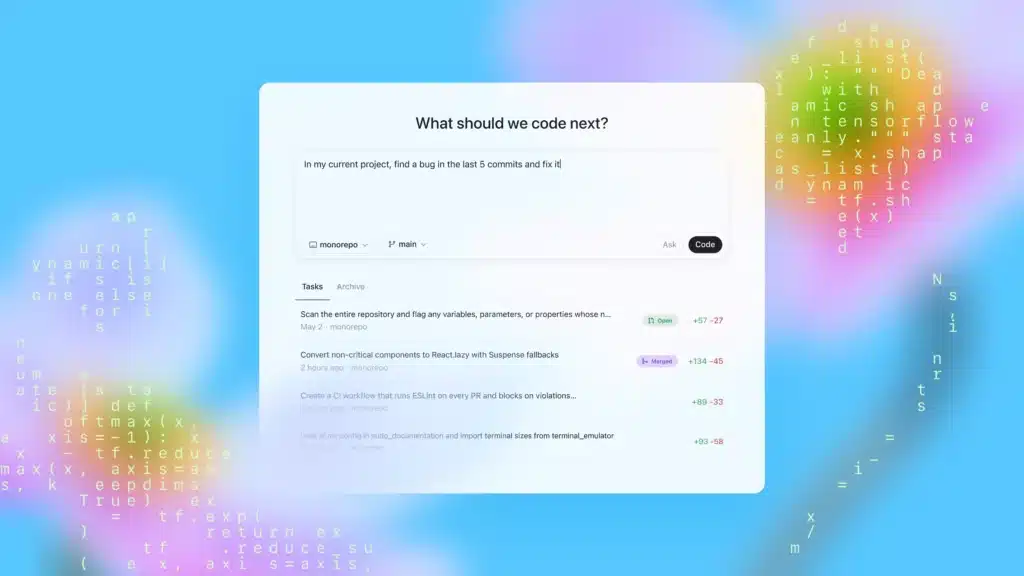
Codex’s interface is designed for simplicity: you issue commands in natural language, and the agent executes them.
What’s the step-by-step workflow?
- Choose “Code” or “Ask”
- Code: Use this when you want Codex to write or modify code.
- Ask: Use this when you need explanations, documentation, or high-level insights about your codebase.
- Type your prompt
- Example: “Implement user authentication using JWT, with email and password login, and store tokens in Redis.”
- Click “Run”
- Codex spins up a sandbox, executes the request, runs tests, and returns a pull-request–style diff.
- Review and Merge
- Inspect the changes, terminal logs, and test results. If satisfactory, merge the pull request into your target branch.
What best practices ensure effective Codex usage?
While Codex can handle complex tasks autonomously, following these guidelines will maximize its effectiveness:
How should I structure prompts for clarity?
Codex’s performance hinges on well-structured prompts. Begin with a high-level comment (e.g., // Generate a function to parse JSON into a Python data class) followed by any skeleton code or type hints. Avoid ambiguity by specifying language, style guides, or test cases.
- Be explicit: Clearly specify inputs, outputs, and edge cases.
- Break tasks into sub-tasks: For multi-step processes, issue sequential prompts—for example, “First, scaffold a REST API for managing products,” then “Add unit tests for the product endpoints.”
- Use examples: Provide sample input/output pairs or refer to existing code patterns in your repo.
How do I manage security and compliance?
- Sandbox auditing: Leverage Codex’s built-in logging to review each command executed.
- Access controls: Restrict repository access to required branches only.
- Review process: Treat Codex–generated pull requests like any other—incorporate peer reviews and automated CI checks.
Handling and Mitigating Errors
Even with precise prompts, Codex may produce quirks—inefficient loops or off-by-one mistakes. Implement error-handling layers:
- Automated Linters: Integrate tools like ESLint or Pylint in your CI pipeline.
- Test-Driven Validation: Require that all generated code pass existing test suites before merging.
- Human Review: Treat Codex suggestions as “first drafts” that benefit from developer oversight.
How does Codex integrate with existing CI/CD pipelines?
Integrating Codex outputs into your continuous integration and deployment workflows ensures seamless delivery.
What integration points are available?
- Pull Request Automation: Codex opens PRs automatically; configure your CI to run builds, tests, and security scans on these PRs.
- Webhook Notifications: Subscribe to Codex events (task started, completed, PR opened) via webhooks to keep teams informed in Slack or Teams.
- Changelog Generation: Codex can generate draft changelogs based on commit diffs; configure it to update your changelog file automatically.
By combining the agentic power of codex-1 with a robust, sandboxed execution environment and seamless integration into ChatGPT and CI/CD pipelines, OpenAI Codex offers a transformative approach to software engineering. Whether you’re an individual developer looking to accelerate feature delivery or part of an enterprise team striving for consistent code quality, understanding how to harness Codex’s capabilities will be essential in the evolving landscape of AI-augmented development.
Getting Started
CometAPI provides a unified REST interface that aggregates hundreds of AI models—under a consistent endpoint, with built-in API-key management, usage quotas, and billing dashboards. Instead of juggling multiple vendor URLs and credentials.
Developers can access chatGPT API suah as GPT-4.1 API those Deadline for article publicationthrough CometAPI. To begin, explore the model’s capabilities in the Playground and consult the API guide for detailed instructions. Before accessing, please make sure you have logged in to CometAPI and obtained the API key. CometAPI offer a price far lower than the official price to help you integrate.