Home/Models/Google/Veo 3.1 Pro
G

Veo 3.1 Pro

Setiap Permintaan:$2
Veo 3.1-Pro merujuk kepada akses/konfigurasi berkeupayaan tinggi bagi keluarga Veo 3.1 daripada Google — satu generasi model video bentuk pendek dengan sokongan audio yang menambah audio natif yang lebih kaya, kawalan penceritaan/penyuntingan yang dipertingkat dan alat peluasan adegan.
Baru
Penggunaan komersial
Playground
Gambaran Keseluruhan
Ciri-ciri
Harga
API
Versi

Veo 3.1-Pro refers to the high-capability access/configuration of Google’s Veo 3.1 family — a generation of short-form, audio-enabled video models that add richer native audio, improved narrative/editing controls and scene-extension tools; the “Pro” label is commonly used to indicate higher access or quality tiers in Google’s subscription and product ecosystem rather than to denote a radically different public architecture.

How to access Veo 3.1 Pro API

Step 1: Sign Up for API Key

Log in to cometapi.com. If you are not our user yet, please register first. Sign into your CometAPI console. Get the access credential API key of the interface. Click “Add Token” at the API token in the personal center, get the token key: sk-xxxxx and submit.
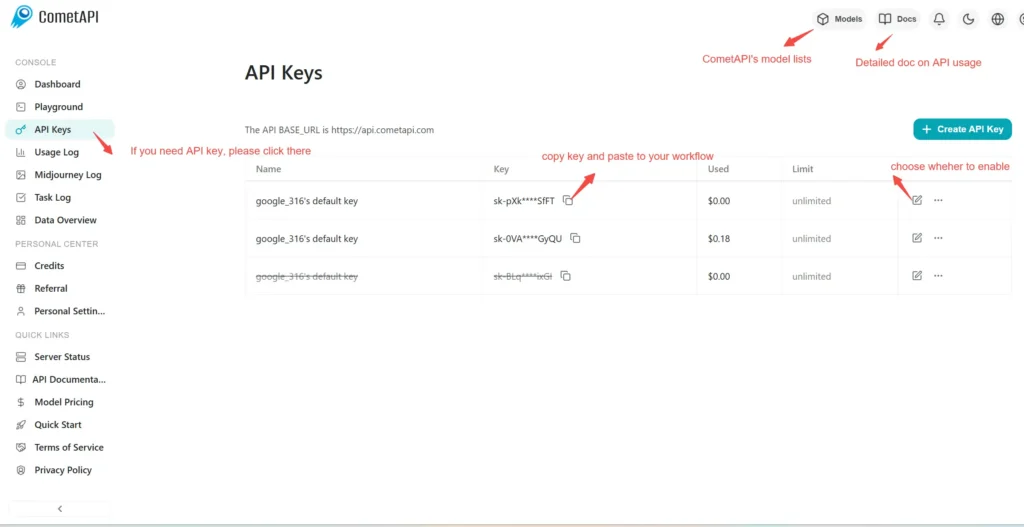
img

Step 2: Send Requests to Veo 3 Pro API

Select the “\veo3.1-pro \” endpoint to send the API request and set the request body. The request method and request body are obtained from our website API doc. Our website also provides Apifox test for your convenience. Replace <YOUR_API_KEY> with your actual CometAPI key from your account. base url is Veo3 Async Generation(https://api.cometapi.com/v1/videos).

Insert your question or request into the content field—this is what the model will respond to . Process the API response to get the generated answer.

Step 3: Retrieve and Verify Results

Process the API response to get the generated answer. After processing, the API responds with the task status and output data.

To learn more about Veo3.1, please see the Veo3.1 page.

Ciri-ciri untuk Veo 3.1 Pro

Terokai ciri-ciri utama Veo 3.1 Pro, yang direka untuk meningkatkan prestasi dan kebolehgunaan. Temui bagaimana keupayaan ini boleh memberi manfaat kepada projek anda dan meningkatkan pengalaman pengguna.

Harga untuk Veo 3.1 Pro

Terokai harga yang kompetitif untuk Veo 3.1 Pro, direka bentuk untuk memenuhi pelbagai bajet dan keperluan penggunaan. Pelan fleksibel kami memastikan anda hanya membayar untuk apa yang anda gunakan, menjadikannya mudah untuk meningkatkan skala apabila keperluan anda berkembang. Temui bagaimana Veo 3.1 Pro boleh meningkatkan projek anda sambil mengekalkan kos yang terurus.
Harga Comet (USD / M Tokens)Harga Rasmi (USD / M Tokens)Diskaun
Setiap Permintaan:$2
Setiap Permintaan:$2.5
-20%

Kod contoh dan API untuk Veo 3.1 Pro

Akses kod sampel yang komprehensif dan sumber API untuk Veo 3.1 Pro bagi memperlancar proses integrasi anda. Dokumentasi terperinci kami menyediakan panduan langkah demi langkah, membantu anda memanfaatkan potensi penuh Veo 3.1 Pro dalam projek anda.
Python
Curl
import os
import time
import requests

# Get your CometAPI key from https://api.cometapi.com/console/token, and paste it here
COMETAPI_KEY = os.environ.get("COMETAPI_KEY") or "<YOUR_COMETAPI_KEY>"
BASE_URL = "https://api.cometapi.com/veo/v1/video"

# Create video generation task
create_response = requests.post(
    f"{BASE_URL}/create",
    headers={
        "Authorization": COMETAPI_KEY,
        "Content-Type": "application/json",
    },
    json={
        "prompt": "An orange cat flying in the blue sky with white clouds, sunlight pouring onto its fur, creating a beautiful and dreamlike scene",
        "model": "veo3.1-pro",
        "enhance_prompt": True,
    },
)

task = create_response.json()
task_id = task["id"]
print(f"Task created: {task_id}")
print(f"Status: {task['status']}")

# Poll until video is ready
while True:
    query_response = requests.get(
        f"{BASE_URL}/query/{task_id}",
        headers={
            "Authorization": f"Bearer {COMETAPI_KEY}",
        },
    )

    result = query_response.json()
    status = result["data"]["status"]
    progress = result["data"].get("progress", "")

    print(f"Checking status... {status} {progress}")

    if status == "SUCCESS" or result["data"]["data"]["status"] == "completed":
        video_url = result["data"]["data"]["video_url"]
        print(f"
Video URL: {video_url}")
        break
    elif status == "FAILED":
        print(f"Failed: {result['data'].get('fail_reason', 'Unknown error')}")
        break

    time.sleep(10)

Versi Veo 3.1 Pro

Sebab Veo 3.1 Pro mempunyai berbilang snapshot mungkin merangkumi faktor berpotensi seperti variasi output selepas kemas kini yang memerlukan snapshot lama untuk konsistensi, menyediakan tempoh peralihan untuk penyesuaian dan migrasi kepada pembangun, serta snapshot berbeza yang sepadan dengan endpoint global atau serantau untuk mengoptimumkan pengalaman pengguna. Untuk perbezaan terperinci antara versi, sila rujuk dokumentasi rasmi.
version
veo3.1-pro

Lebih Banyak Model