Unlock exclusive introductory pricing for the newly launched Gemini 3.5 Flash.
X

mimo-v2-omni

Inndata:$0.32/M
Utdata:$1.6/M
Utgitt:Mar 24, 2026

MiMo-V2-Omni is a frontier omni-modal model that natively processes image, video, and audio inputs within a unified architecture. It combines strong multimodal perception with agentic capability - visual grounding, multi-step planning, tool use, and code execution - making it well-suited for complex real-world tasks that span modalities. 256K context window.

Ny
Kommersiell bruk

Playground for mimo-v2-omni

Utforsk mimo-v2-omni's Playground โ€” et interaktivt miljรธ for รฅ teste modeller og kjรธre spรธrringer i sanntid. Prรธv prompts, juster parametere og iterer umiddelbart for รฅ akselerere utvikling og validere brukstilfeller.

MiMo-V2-Omni Overview

MiMo-V2-Omni is Xiaomi MiMoโ€™s omni foundation model for the API platform, built to see, hear, read, and act in the same workflow. Xiaomi positions it as a multimodal agent model that combines image, video, audio, and text understanding with structured tool calling, function execution, and UI grounding.

Technical specifications

ItemMiMo-V2-Omni
ProviderXiaomi MiMo
Model familyMiMo-V2
ModalityImage, video, audio, text
Output typeText
Native audio supportYes
Native audio-video joint inputYes
Structured tool callingYes
Function executionYes
UI groundingYes
Long audio handlingOver 10 hours continuous audio understanding
Release date2026-03-18
Public numeric context lengthNot stated on the official Omni page

What is MiMo-V2-Omni?

MiMo-V2-Omni is designed for agentic systems that need perception and action in one model. Xiaomi says the model fuses dedicated image, video, and audio encoders into one shared backbone, then trains it to anticipate what should happen next rather than only describe what is already visible.

Main features of MiMo-V2-Omni

  • Unified multimodal perception: image, video, audio, and text are handled as one perceptual stream rather than separate add-ons.
  • Agent-ready outputs: the model natively supports structured tool calling, function execution, and UI grounding for real agent frameworks.
  • Long-form audio understanding: Xiaomi claims it can handle continuous audio longer than 10 hours, which is unusually strong for a general omni model.
  • Native audio-video reasoning: the official page highlights joint audio-video input for video comprehension instead of a text-only transcript pipeline.
  • Browser and workflow execution: Xiaomi demonstrates end-to-end browser shopping and TikTok upload flows using MiMo-V2-Omni plus OpenClaw.
  • Perception-to-action framing: the model is trained to connect what it sees with what it should do next, which is the core difference between a demo model and an agentic model.

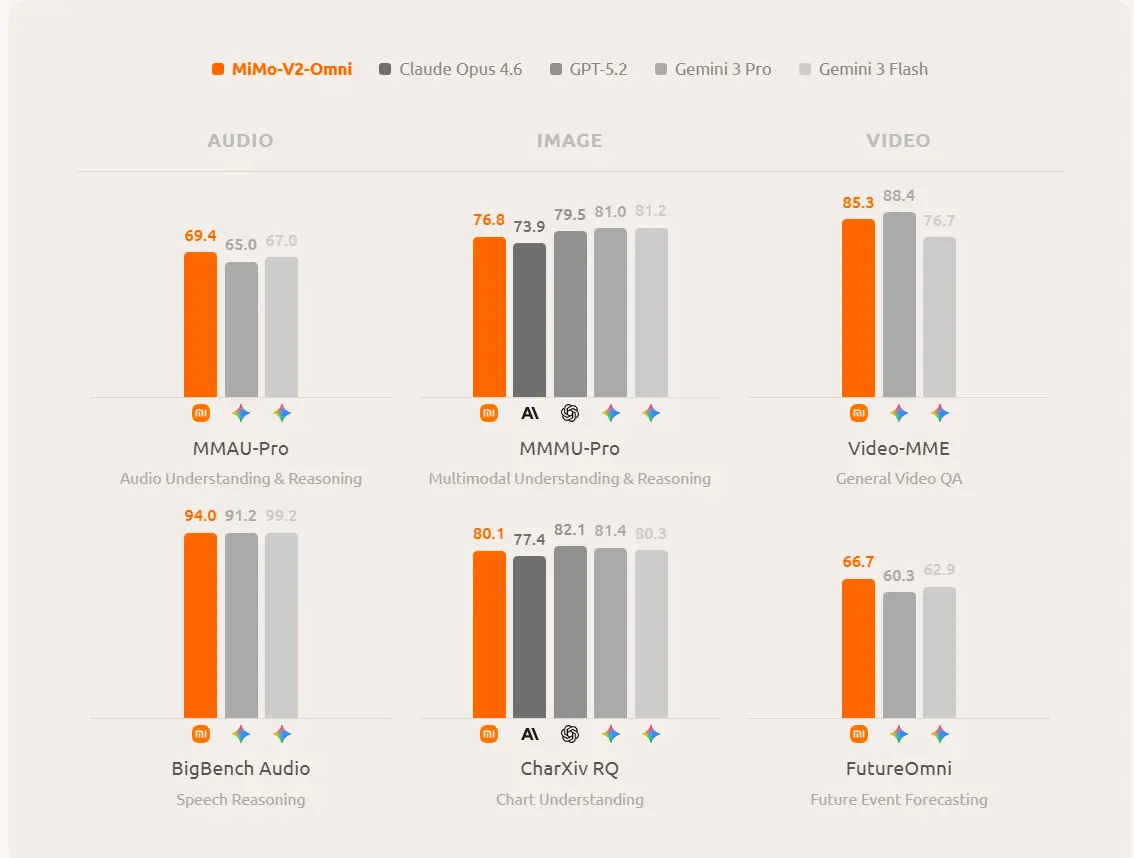
Benchmark performance
mimo-v2-omni

It clearly states that Omni exceeds Gemini 3 Pro on audio understanding, exceeds Claude Opus 4.6 on image understanding, and performs on par with the strongest reasoning models on agentic productivity benchmarks.

MiMo-V2-Omni vs MiMo-V2-Pro vs MiMo-V2-Flash

ModelCore strengthContext / scaleBest fit
MiMo-V2-OmniMultimodal perception + agent actionPublic context length not stated on the Omni pageAudio, image, video, UI, and browser agents
MiMo-V2-ProLargest flagship agent modelUp to 1M-token context; 1T+ params, 42B activeHeavy agent orchestration and long-horizon work
MiMo-V2-FlashFast reasoning and coding256K context; 309B total, 15B activeEfficient reasoning, coding, and high-throughput agent tasks

Best use cases

MiMo-V2-Omni is the right pick when your workflow depends on non-text inputs or outputs: screen understanding, voice and audio analysis, video review, browser automation, multimodal assistants, and robotics-style agent loops. If your workload is mostly text-only and you care more about raw speed or maximum context, the sibling Pro and Flash models are the more obvious alternatives.

FAQ

Priser for mimo-v2-omni

Utforsk konkurransedyktige priser for mimo-v2-omni, designet for รฅ passe ulike budsjetter og bruksbehov. Vรฅre fleksible planer sikrer at du bare betaler for det du bruker, noe som gjรธr det enkelt รฅ skalere etter hvert som kravene dine vokser. Oppdag hvordan mimo-v2-omni kan forbedre prosjektene dine samtidig som kostnadene holdes hรฅndterbare.

Comet Price (USD / M Tokens)Official Price (USD / M Tokens)Discount
Inndata:$0.32/M
Utdata:$1.6/M
Inndata:$0.4/M
Utdata:$2/M
-20%

Eksempelkode og API for mimo-v2-omni

Fรฅ tilgang til omfattende eksempelkode og API-ressurser for mimo-v2-omni for รฅ effektivisere integreringsprosessen din. Vรฅr detaljerte dokumentasjon gir trinn-for-trinn-veiledning som hjelper deg med รฅ utnytte det fulle potensialet til mimo-v2-omni i prosjektene dine.

# Get your CometAPI key from https://api.cometapi.com/console/token
# Export it as: export COMETAPI_KEY="your-key-here"

curl https://api.cometapi.com/v1/chat/completions \
  -H "Authorization: Bearer $COMETAPI_KEY" \
  -H "Content-Type: application/json" \
  -d '{
    "model": "mimo-v2-omni",
    "messages": [
      {"role": "system", "content": "You are a helpful assistant."},
      {"role": "user", "content": "Who is Lei Jun?"}
    ],
    "tools": [{"type": "web_search", "force_search": true, "max_keyword": 3, "limit": 1}],
    "thinking": {"type": "disabled"}
  }'

cURL Code Example

# Get your CometAPI key from https://api.cometapi.com/console/token
# Export it as: export COMETAPI_KEY="your-key-here"

curl https://api.cometapi.com/v1/chat/completions \
  -H "Authorization: Bearer $COMETAPI_KEY" \
  -H "Content-Type: application/json" \
  -d '{
    "model": "mimo-v2-omni",
    "messages": [
      {"role": "system", "content": "You are a helpful assistant."},
      {"role": "user", "content": "Who is Lei Jun?"}
    ],
    "tools": [{"type": "web_search", "force_search": true, "max_keyword": 3, "limit": 1}],
    "thinking": {"type": "disabled"}
  }'

Python Code Example

from openai import OpenAI
import os

# Get your CometAPI key from https://api.cometapi.com/console/token, and paste it here
COMETAPI_KEY = os.environ.get("COMETAPI_KEY") or "<YOUR_COMETAPI_KEY>"

client = OpenAI(api_key=COMETAPI_KEY, base_url="https://api.cometapi.com/v1")

# mimo-v2-omni: built-in web_search tool (pass as top-level tools param)
completion = client.chat.completions.create(
    model="mimo-v2-omni",
    messages=[
        {"role": "system", "content": "You are a helpful assistant."},
        {"role": "user", "content": "Who is Lei Jun?"},
    ],
    tools=[{"type": "web_search", "force_search": True, "max_keyword": 3, "limit": 1}],
    tool_choice="auto",
    extra_body={"thinking": {"type": "disabled"}},
)

msg = completion.choices[0].message
if msg.content:
    print(msg.content)

# annotations are populated when web_search runs (content may be null on search-only responses)
raw = completion.model_dump()
annotations = raw["choices"][0]["message"].get("annotations") or []
if annotations:
    print("\n--- Sources ---")
    for ann in annotations:
        c = ann.get("url_citation") or {}
        print(f"[{c.get('title')}] {c.get('url')}")

JavaScript Code Example

// Get your CometAPI key from https://api.cometapi.com/console/token, and paste it here
const api_key = process.env.COMETAPI_KEY || "<YOUR_COMETAPI_KEY>";

// mimo-v2-omni: use fetch for web_search (non-standard tool type unsupported by openai SDK)
const resp = await fetch("https://api.cometapi.com/v1/chat/completions", {
  method: "POST",
  headers: { Authorization: `Bearer ${api_key}`, "Content-Type": "application/json" },
  body: JSON.stringify({
    model: "mimo-v2-omni",
    messages: [
      { role: "system", content: "You are a helpful assistant." },
      { role: "user", content: "Who is Lei Jun?" },
    ],
    tools: [{ type: "web_search", force_search: true, max_keyword: 3, limit: 1 }],
    tool_choice: "auto",
    thinking: { type: "disabled" },
  }),
});

const data = await resp.json();
const msg = data.choices[0].message;
if (msg.content) console.log(msg.content);

const annotations = msg.annotations ?? [];
if (annotations.length) {
  console.log("\n--- Sources ---");
  for (const ann of annotations) {
    const c = ann.url_citation ?? {};
    console.log(`[${c.title}] ${c.url}`);
  }
}