Home/Models/Google/Veo 3.1 Pro
G

Veo 3.1 Pro

Na żądanie:$2
Veo 3.1‑Pro oznacza dostęp/konfigurację o wysokich możliwościach w rodzinie Veo 3.1 firmy Google — generacji modeli wideo do krótkich form z obsługą audio, które wprowadzają bogatsze natywne audio, ulepszone narzędzia sterowania narracją i montażem oraz narzędzia do rozszerzania scen.
Nowy
Użycie komercyjne
Playground
Przegląd
Funkcje
Cennik
API
Wersje

Veo 3.1-Pro refers to the high-capability access/configuration of Google’s Veo 3.1 family — a generation of short-form, audio-enabled video models that add richer native audio, improved narrative/editing controls and scene-extension tools; the “Pro” label is commonly used to indicate higher access or quality tiers in Google’s subscription and product ecosystem rather than to denote a radically different public architecture.

How to access Veo 3.1 Pro API

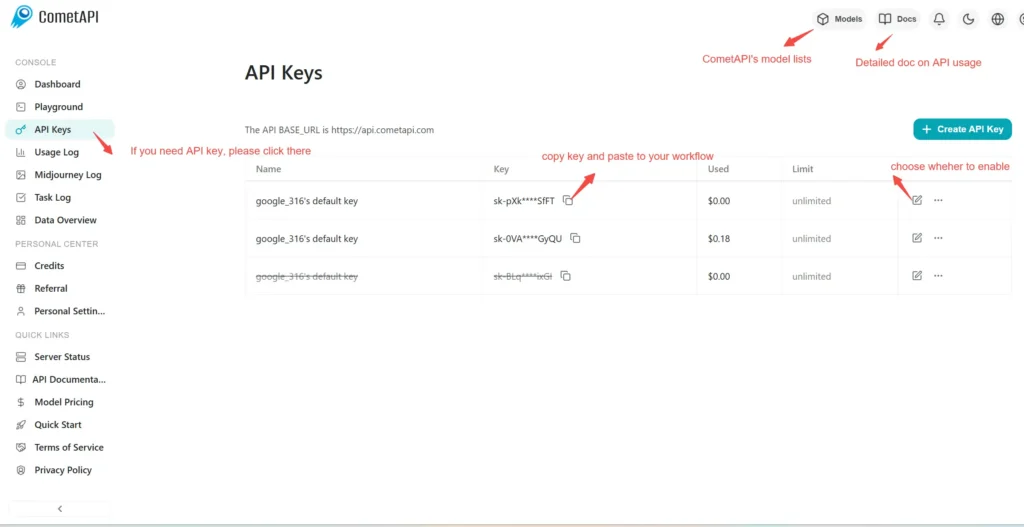
Step 1: Sign Up for API Key

Log in to cometapi.com. If you are not our user yet, please register first. Sign into your CometAPI console. Get the access credential API key of the interface. Click “Add Token” at the API token in the personal center, get the token key: sk-xxxxx and submit.
img

Step 2: Send Requests to Veo 3 Pro API

Select the “\veo3.1-pro \” endpoint to send the API request and set the request body. The request method and request body are obtained from our website API doc. Our website also provides Apifox test for your convenience. Replace <YOUR_API_KEY> with your actual CometAPI key from your account. base url is Veo3 Async Generation(https://api.cometapi.com/v1/videos).

Insert your question or request into the content field—this is what the model will respond to . Process the API response to get the generated answer.

Step 3: Retrieve and Verify Results

Process the API response to get the generated answer. After processing, the API responds with the task status and output data.

To learn more about Veo3.1, please see the Veo3.1 page.

Funkcje dla Veo 3.1 Pro

Poznaj kluczowe funkcje Veo 3.1 Pro, zaprojektowane w celu zwiększenia wydajności i użyteczności. Odkryj, jak te możliwości mogą przynieść korzyści Twoim projektom i poprawić doświadczenie użytkownika.

Cennik dla Veo 3.1 Pro

Poznaj konkurencyjne ceny dla Veo 3.1 Pro, zaprojektowane tak, aby pasowały do różnych budżetów i potrzeb użytkowania. Nasze elastyczne plany zapewniają, że płacisz tylko za to, czego używasz, co ułatwia skalowanie w miarę wzrostu Twoich wymagań. Odkryj, jak Veo 3.1 Pro może ulepszyć Twoje projekty przy jednoczesnym utrzymaniu kosztów na rozsądnym poziomie.
Cena Comet (USD / M Tokens)Oficjalna cena (USD / M Tokens)Zniżka
Na żądanie:$2
Na żądanie:$2.5
-20%

Przykładowy kod i API dla Veo 3.1 Pro

Uzyskaj dostęp do kompleksowego przykładowego kodu i zasobów API dla Veo 3.1 Pro, aby usprawnić proces integracji. Nasza szczegółowa dokumentacja zapewnia wskazówki krok po kroku, pomagając wykorzystać pełny potencjał Veo 3.1 Pro w Twoich projektach.
Python
Curl
import os
import time
import requests

# Get your CometAPI key from https://api.cometapi.com/console/token, and paste it here
COMETAPI_KEY = os.environ.get("COMETAPI_KEY") or "<YOUR_COMETAPI_KEY>"
BASE_URL = "https://api.cometapi.com/veo/v1/video"

# Create video generation task
create_response = requests.post(
    f"{BASE_URL}/create",
    headers={
        "Authorization": COMETAPI_KEY,
        "Content-Type": "application/json",
    },
    json={
        "prompt": "An orange cat flying in the blue sky with white clouds, sunlight pouring onto its fur, creating a beautiful and dreamlike scene",
        "model": "veo3.1-pro",
        "enhance_prompt": True,
    },
)

task = create_response.json()
task_id = task["id"]
print(f"Task created: {task_id}")
print(f"Status: {task['status']}")

# Poll until video is ready
while True:
    query_response = requests.get(
        f"{BASE_URL}/query/{task_id}",
        headers={
            "Authorization": f"Bearer {COMETAPI_KEY}",
        },
    )

    result = query_response.json()
    status = result["data"]["status"]
    progress = result["data"].get("progress", "")

    print(f"Checking status... {status} {progress}")

    if status == "SUCCESS" or result["data"]["data"]["status"] == "completed":
        video_url = result["data"]["data"]["video_url"]
        print(f"
Video URL: {video_url}")
        break
    elif status == "FAILED":
        print(f"Failed: {result['data'].get('fail_reason', 'Unknown error')}")
        break

    time.sleep(10)

Wersje modelu Veo 3.1 Pro

Powody, dla których Veo 3.1 Pro posiada wiele migawek, mogą obejmować takie czynniki jak: różnice w wynikach po aktualizacjach wymagające starszych migawek dla zachowania spójności, zapewnienie programistom okresu przejściowego na adaptację i migrację, oraz różne migawki odpowiadające globalnym lub regionalnym punktom końcowym w celu optymalizacji doświadczenia użytkownika. Aby poznać szczegółowe różnice między wersjami, zapoznaj się z oficjalną dokumentacją.
version
veo3.1-pro

Więcej modeli