Technical Specifications of GLM-5-Turbo
| Item | GLM-5-Turbo (estimated / early release) |
|---|---|
| Model family | GLM-5 (Turbo variant – low-latency optimized) |
| Provider | Zhipu AI (Z.ai) |
| Architecture | Mixture-of-Experts (MoE) with sparse attention |
| Input types | Text |
| Output types | Text |
| Context window | ~200,000 tokens |
| Max output tokens | Up to ~128,000 (early reports) |
| Core focus | Agent workflows, tool use, fast inference |
| Release status | Experimental / partially closed-source |
What is GLM-5-Turbo
GLM-5-Turbo is a latency-optimized variant of the GLM-5 model family, designed specifically for production-grade agent workflows and real-time applications. It builds on GLM-5’s large-scale MoE architecture (~745B parameters) and shifts the focus toward speed, responsiveness, and tool orchestration reliability rather than maximum reasoning depth.
Unlike the base GLM-5 (which targets frontier-level reasoning and coding benchmarks), the Turbo version is tuned for interactive systems, automation pipelines, and multi-step tool execution.
Key Features of GLM-5-Turbo
- Low-latency inference: Optimized for faster response times compared to standard GLM-5, making it suitable for real-time applications.
- Agent-first training: Designed around tool use and multi-step workflows from the training phase, not just post-training fine-tuning.
- Large context window (200K): Handles long documents, codebases, and multi-step reasoning chains in a single session.
- Strong tool-calling reliability: Improved function execution and workflow chaining for agent systems.
- Efficient MoE architecture: Activates only a subset of parameters per token, balancing cost and performance.
- Production-oriented design: Prioritizes stability and throughput over maximum benchmark scores.
Benchmark & Performance Insights
While GLM-5-Turbo-specific benchmarks are not fully disclosed, it inherits performance characteristics from GLM-5:
- ~77.8% on SWE-bench Verified (GLM-5 baseline)
- Strong performance in agentic coding and long-horizon tasks
- Competitive with models like Claude Opus and GPT-class systems in reasoning and coding
👉 Turbo trades some peak accuracy for faster inference and better real-time usability.
GLM-5-Turbo vs Comparable Models
| Model | Strength | Weakness | Best Use Case |
|---|---|---|---|
| GLM-5-Turbo | Fast, agent-focused, long context | Less peak reasoning vs flagship | Real-time agents, automation |
| GLM-5 (base) | Strong reasoning, high benchmarks | Slower inference | Research, complex coding |
| GPT-5-class models | Top-tier reasoning, multimodal | Higher cost, closed | Enterprise-grade AI |
| Claude Opus (latest) | Reliable reasoning, safety | Slower in agent loops | Long-form reasoning |
Best Use Cases
- AI agents & automation pipelines (multi-step workflows)
- Real-time chat systems requiring low latency
- Tool-integrated applications (APIs, retrieval, function calls)
- Developer copilots with fast feedback loops
- Long-context applications like document analysis
How to access GLM-5 Turbo API
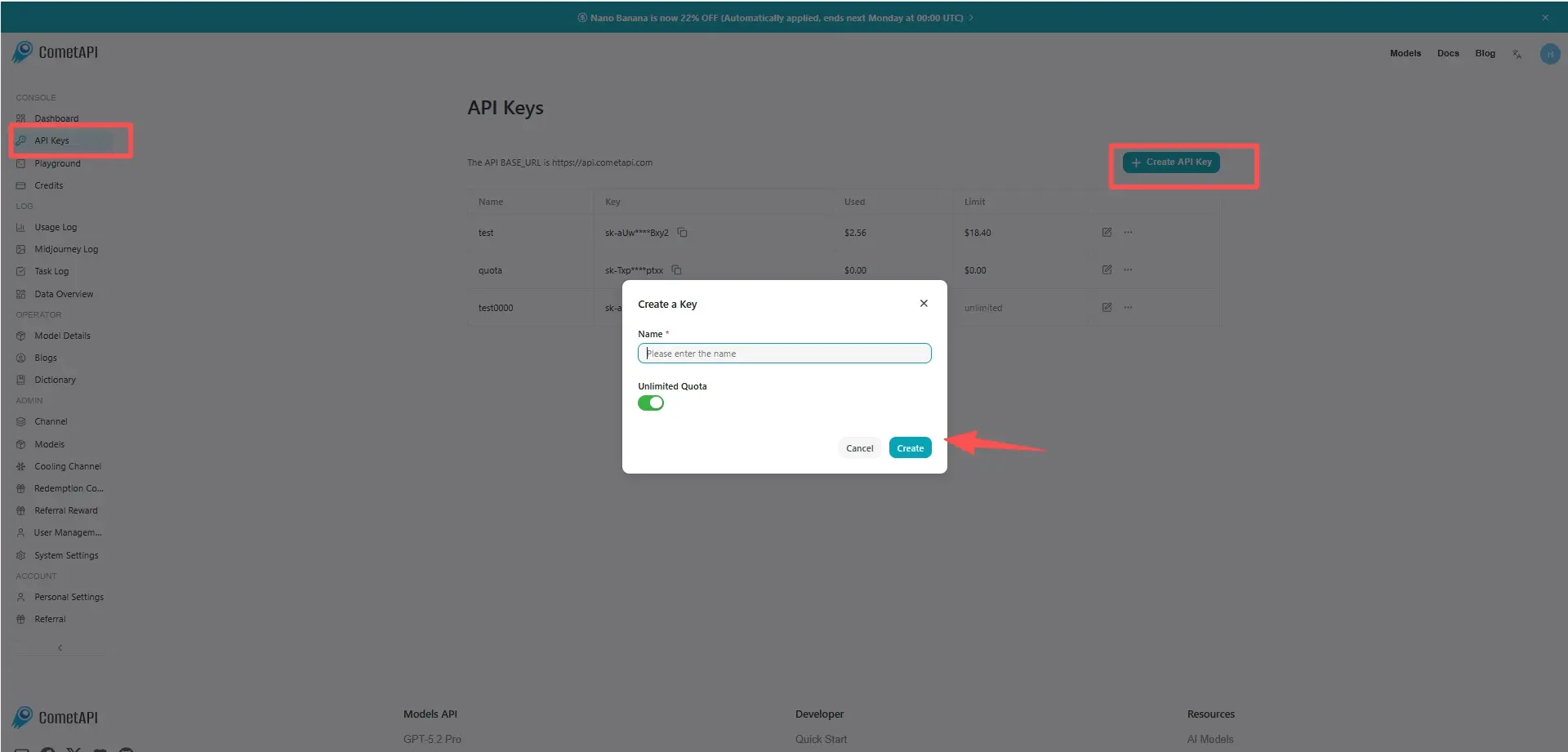
Step 1: Sign Up for API Key
Log in to cometapi.com. If you are not our user yet, please register first. Sign into your CometAPI console. Get the access credential API key of the interface. Click “Add Token” at the API token in the personal center, get the token key: sk-xxxxx and submit.
Step 2: Send Requests to GLM-5 Turbo API
Select the “glm-5-turbo” endpoint to send the API request and set the request body. The request method and request body are obtained from our website API doc. Our website also provides Apifox test for your convenience. Replace <YOUR_API_KEY> with your actual CometAPI key from your account. base url is Chat Completions
Insert your question or request into the content field—this is what the model will respond to . Process the API response to get the generated answer.
Step 3: Retrieve and Verify Results
Process the API response to get the generated answer. After processing, the API responds with the task status and output data.