Key features
- Native / high-quality text rendering inside images — excels at producing legible, semantically-accurate text in generated images (posters, packaging, screenshots) — an area many earlier image models struggled with.
- High-fidelity multimodal output — produces photorealistic and stylized images with good detail and language-aware layout.
- Style transfer & detail enhancement — can apply consistent artistic styles or enhance local details while preserving scene coherence.
Technical details — how Qwen-Image works
Architecture and components (keywords: MMDiT, Qwen2.5-VL). The model uses an MMDiT-based diffusion transformer for image synthesis combined with a visual-language encoder (Qwen2.5-VL) to interpret prompts and visual context. This separation lets the model treat semantic guidance and pixel appearance differently, improving text fidelity and edit consistency. The official repository and technical report note a 20B-parameter backbone for the main T2I model.
Training pipeline (keywords: curriculum learning, data pipeline). To solve hard text rendering, Qwen-Image uses a progressive curriculum: it starts with simpler non-text images and gradually trains on more complex text-rich examples up to paragraph-level inputs. The team constructed a comprehensive pipeline that includes large-scale collection, careful filtering, synthetic augmentation and balancing to ensure the model sees many realistic text/photo compositions during training. This strategic curriculum is a key reason the model excels at multilingual text rendering.
Editing mechanism (keywords: dual-encoding, VAE + VL encoder). For editing, the system feeds the original image twice: once into the Qwen2.5-VL encoder for semantic control and once into a VAE encoder for reconstructive appearance information. The dual-encoding design enables the edit module to preserve identity and visual fidelity while allowing semantic modifications — for example, replacing an object or changing textual content without degrading unrelated regions.
Benchmark performance
Qwen-Image achieves SOTA or near-SOTA performance across multiple public benchmarks for both generation and editing, with particularly strong results in text rendering tasks and real-world composition benchmarks (e.g., T2I-CoreBench and curated image-editing suites).
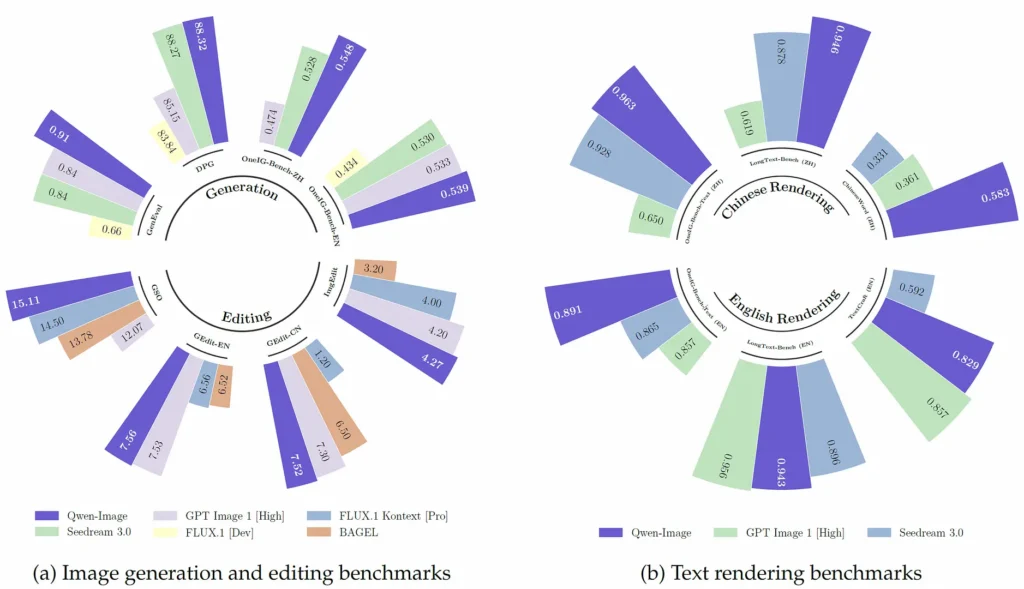
How Qwen-Image compares to other leading models
Relative strengths: text rendering and bilingual text fidelity are the model’s distinctive advantages versus many generative competitors (e.g., DALL·E 3, SDXL, Midjourney), which are frequently stronger in purely artistic composition or stylistic diversity but weaker at dense multi-line or Chinese text layout. Multiple community comparisons and the model authors’ benchmark tables support this characterization.
Relative tradeoffs: compared to closed, heavily tuned commercial systems, Qwen-Image may require post-processing or prompt/adapter tuning to reach identical realism in some contexts (curved-surface warping, photorealistic compositing), per independent tests. For users prioritizing templated designs, packaging mockups, or bilingual text layouts, Qwen-Image tends to be preferable.
Typical and high-value use cases
- Packaging & product mockups: accurate text and multi-line layouts for labels and packaging trials.
- Advertising & design drafts: rapid prototyping where text fidelity matters (posters, banners).
- Documentized image generation: generating images that must include readable content (menus, signs, interfaces).
- Image editing pipelines: targeted edits (text replacement, object add/remove) preserving style and perspective.
- How to access Qwen image API
Step 1: Sign Up for API Key
Log in to cometapi.com. If you are not our user yet, please register first. Sign into your CometAPI console. Get the access credential API key of the interface. Click “Add Token” at the API token in the personal center, get the token key: sk-xxxxx and submit.
Step 2: Send Requests to Qwen image API
Select the “qwen-image ”endpoint to send the API request and set the request body. The request method and request body are obtained from our website API doc. Our website also provides Apifox test for your convenience. Replace <YOUR_API_KEY> with your actual CometAPI key from your account. base url is Images format(https://api.cometapi.com/v1/images/generations) via CometAPI.
Insert your question or request into the content field—this is what the model will respond to .
Step 3: Retrieve and Verify Results
Process the API response to get the generated answer. After processing, the API responds with the task status and output data.