Unlock exclusive introductory pricing for the newly launched Gemini 3.5 Flash.
O

gpt-audio-1.5

Entrada:$2/M
Saรญda:$8/M
Lanรงado:Feb 24, 2026

The best voice model for audio in, audio out with Chat Completions.

Novo
Popular
Uso comercial

Technical specifications of gpt-audio-1.5

Itemgpt-audio-1.5 (public specs)
Model familyGPT Audio family (audio-first variant)
Input typesText, audio (speech in)
Output typesText, audio (speech out), structured outputs (function calls supported)
Context window128,000 tokens.
Max output tokens16,384 (documented in related gpt-audio listing).
Performance tierHigher intelligence; Medium speed (balanced).
Latency profileOptimized for voice interactions (mid/low latency depending on endpoint).
AvailabilityChat Completions API (audio in/out) and platform playgrounds; integrated across realtime/voice surfaces.
Safety / usage notesGuardrails for voice content; treat model outputs with the usual safety and verification for production voice agents.

Note: gpt-realtime-1.5 is a closely related realtime audio/voice-first variant optimized for lower latency and realtime sessions; compare below.


What is gpt-audio-1.5?

gpt-audio-1.5 is an audio-capable GPT model that supports both speech input and speech output through the Chat Completions and related audio-capable APIs. It's positioned as the main generally-available audio model for building voice agents and speech-first experiences while balancing quality and speed.


Main features

  1. Speech-in / speech-out support: Handle spoken input and return spoken or textual responses for natural voice flows.
  2. Large context for audio workflows: Supports very large context (documented 128k tokens) enabling multi-turn, long conversation history or large multimodal sessions.
  3. Streaming & Chat Completions compatibility: Works inside Chat Completions with streaming audio responses and function-call structured outputs.
  4. Balanced performance/latency: Tuned to provide high quality audio responses at medium throughputโ€”suitable for chatbots and voice assistants where quality matters.
  5. Ecosystem & integrations: Supported in the platformโ€™s playgrounds and available across official realtime/voice endpoints and partner integrations (Azure/Microsoft Foundry notes reference similar audio models).
Propertygpt-audio-1.5gpt-realtime-1.5
Primary focusHigh-quality audio in/out for Chat Completions and conversational flows.Realtime S2S (speech-to-speech) with lower latency for live voice agents and streaming scenarios.
Context window128k tokens.32k tokens (realtime variant documented).
Max output tokens16,384 (documented).Typically configured for shorter realtime responses (docs list smaller max tokens).
Best useChatbots, voice-enabled assistants where full chat semantics + audio are required.Live voice agents, kiosks, and low-latency conversational interfaces.

Representative use cases

  • Conversational voice agents for customer support and internal help desks.
  • Voice-enabled assistants embedded in apps, devices, and kiosks.
  • Hands-free workflows (dictation, voice search, accessibility).
  • Multimodal experiences that mix audio with text / images via Chat Completions.

Limitations & operational considerations

  • Not a drop-in replacement for human QA: Always validate speech outputs and downstream actions with human review in production flows.
  • Resource planning: Large context and audio I/O can increase compute and latencyโ€”design streaming/segmentation strategies for long sessions.
  • Safety & policy constraints: Voice outputs can carry persuasive power; follow platform safety guidelines and guardrails when deploying at scale.
  • How to access GPT Audio 1.5 API

Step 1: Sign Up for API Key

Log in toย cometapi.com. If you are not our user yet, please register first. Sign into yourย CometAPI console. Get the access credential API key of the interface. Click โ€œAdd Tokenโ€ at the API token in the personal center, get the token key: sk-xxxxx and submit.
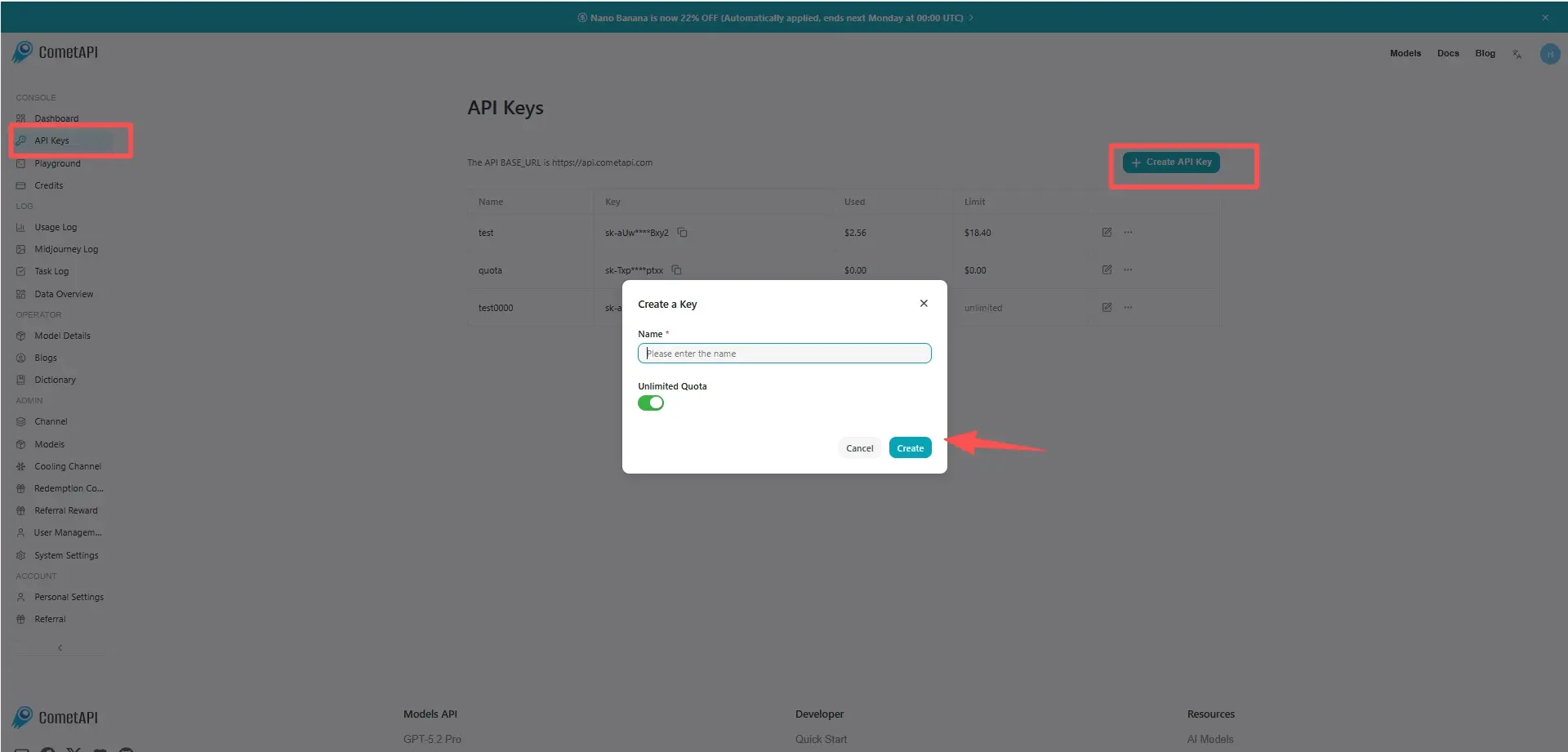
cometapi-key

Step 2: Send Requests to GPT Audio 1.5 API

Select the โ€œgpt-audio-1.5โ€ endpoint to send the API request and set the request body. The request method and request body are obtained from our website API doc. Our website also provides Apifox test for your convenience. Replace <YOUR_API_KEY> with your actual CometAPI key from your account. base url isย Chat Completions

Insert your question or request into the content fieldโ€”this is what the model will respond to . Process the API response to get the generated answer.

Step 3: Retrieve and Verify Results

Process the API response to get the generated answer. After processing, the API responds with the task status and output data.

FAQ

Preรงos para gpt-audio-1.5

Explore preรงos competitivos para gpt-audio-1.5, projetado para atender diversos orรงamentos e necessidades de uso. Nossos planos flexรญveis garantem que vocรช pague apenas pelo que usar, facilitando o dimensionamento conforme suas necessidades crescem. Descubra como gpt-audio-1.5 pode aprimorar seus projetos mantendo os custos gerenciรกveis.

Comet Price (USD / M Tokens)Official Price (USD / M Tokens)Discount
Entrada:$2/M
Saรญda:$8/M
Entrada:$2.5/M
Saรญda:$10/M
-20%

Cรณdigo de exemplo e API para gpt-audio-1.5

Acesse cรณdigo de exemplo abrangente e recursos de API para gpt-audio-1.5 para otimizar seu processo de integraรงรฃo. Nossa documentaรงรฃo detalhada fornece orientaรงรฃo passo a passo, ajudando vocรช a aproveitar todo o potencial do gpt-audio-1.5 em seus projetos.

# Get your CometAPI key from https://api.cometapi.com/console/token
# Export it as: export COMETAPI_KEY="your-key-here"

RESPONSE=$(curl https://api.cometapi.com/v1/chat/completions \
  -s \
  -H "Content-Type: application/json" \
  -H "Authorization: Bearer $COMETAPI_KEY" \
  -d '{
    "model": "gpt-audio-1.5",
    "modalities": ["text", "audio"],
    "audio": {
      "voice": "alloy",
      "format": "wav"
    },
    "messages": [
      {
        "role": "user",
        "content": "Is a golden retriever a good family dog?"
      }
    ]
  }')

# Print the text transcript
echo "$RESPONSE" | python3 -c "import sys, json; r=json.load(sys.stdin); print(r['choices'][0]['message']['audio']['transcript'])"

# Save the audio to a WAV file
echo "$RESPONSE" | python3 -c "
import sys, json, base64
r = json.load(sys.stdin)
audio_data = r['choices'][0]['message']['audio']['data']
with open('gpt-audio-1.5-output.wav', 'wb') as f:
    f.write(base64.b64decode(audio_data))
print('Audio saved to gpt-audio-1.5-output.wav')
"

cURL Code Example

# Get your CometAPI key from https://api.cometapi.com/console/token
# Export it as: export COMETAPI_KEY="your-key-here"

RESPONSE=$(curl https://api.cometapi.com/v1/chat/completions \
  -s \
  -H "Content-Type: application/json" \
  -H "Authorization: Bearer $COMETAPI_KEY" \
  -d '{
    "model": "gpt-audio-1.5",
    "modalities": ["text", "audio"],
    "audio": {
      "voice": "alloy",
      "format": "wav"
    },
    "messages": [
      {
        "role": "user",
        "content": "Is a golden retriever a good family dog?"
      }
    ]
  }')

# Print the text transcript
echo "$RESPONSE" | python3 -c "import sys, json; r=json.load(sys.stdin); print(r['choices'][0]['message']['audio']['transcript'])"

# Save the audio to a WAV file
echo "$RESPONSE" | python3 -c "
import sys, json, base64
r = json.load(sys.stdin)
audio_data = r['choices'][0]['message']['audio']['data']
with open('gpt-audio-1.5-output.wav', 'wb') as f:
    f.write(base64.b64decode(audio_data))
print('Audio saved to gpt-audio-1.5-output.wav')
"

Python Code Example

from openai import OpenAI
import os
import base64

# Get your CometAPI key from https://api.cometapi.com/console/token, and paste it here
COMETAPI_KEY = os.environ.get("COMETAPI_KEY") or "<YOUR_COMETAPI_KEY>"
BASE_URL = "https://api.cometapi.com/v1"

client = OpenAI(base_url=BASE_URL, api_key=COMETAPI_KEY)

completion = client.chat.completions.create(
    model="gpt-audio-1.5",
    modalities=["text", "audio"],
    audio={"voice": "alloy", "format": "wav"},
    messages=[
        {
            "role": "user",
            "content": "Is a golden retriever a good family dog?"
        }
    ],
)

# Print the text response
print(completion.choices[0].message.audio.transcript)

# Save the audio response to a file
wav_bytes = base64.b64decode(completion.choices[0].message.audio.data)
output_path = "gpt-audio-1.5-output.wav"
with open(output_path, "wb") as f:
    f.write(wav_bytes)
print(f"Audio saved to {output_path}")

JavaScript Code Example

import OpenAI from "openai";
import fs from "fs";

// Get your CometAPI key from https://api.cometapi.com/console/token, and paste it here
const api_key = process.env.COMETAPI_KEY || "<YOUR_COMETAPI_KEY>";
const base_url = "https://api.cometapi.com/v1";

const openai = new OpenAI({ apiKey: api_key, baseURL: base_url });

const completion = await openai.chat.completions.create({
  model: "gpt-audio-1.5",
  modalities: ["text", "audio"],
  audio: { voice: "alloy", format: "wav" },
  messages: [
    {
      role: "user",
      content: "Is a golden retriever a good family dog?",
    },
  ],
});

// Print the text transcript
console.log(completion.choices[0].message.audio.transcript);

// Save the audio response to a file
const wavBytes = Buffer.from(completion.choices[0].message.audio.data, "base64");
const outputPath = "gpt-audio-1.5-output.wav";
fs.writeFileSync(outputPath, wavBytes);
console.log(`Audio saved to ${outputPath}`);