Key features (what Flux.2 Dev does)
- Text→Image generation with high prompt adherence and improved typography / small-detail rendering.
- Multi-reference editing — combine multiple reference images into a single output, preserving identity/style consistency
- Single checkpoint for generation + editing (no separate editing model required).
- Large open-weight checkpoint (32B) permitting local research, quantization, and community adaptation.)
- Optimized VAE for an improved learnability–quality–compression tradeoff (enables 4MP editing/outputs).
Technical details (architecture & engineering)
- Parameter count: 32 billion parameters for the FLUX.2 checkpoint.
- Core design: latent flow-matching / rectified flow transformer combined with a vision-language model (BFL says they couple a Mistral-3 24B VLM with the transformer backbone for semantic grounding). The VLM contributes world knowledge and textual grounding while the transformer models spatial/compositional structure.
- VAE: new FLUX.2 VAE (released under Apache-2.0) retrained to improve reconstruction fidelity and latent learnability, enabling high-resolution editing.
- Sampling & distillation: trained using guidance-distillation techniques to improve inference efficiency and fidelity.
Benchmark performance
Black Forest Labs published comparative evaluations and charts showing FLUX.2’s performance vs. contemporary open-weight and hosted image models. Key published figures (BFL / press summaries):
- Text-to-image win rate: FLUX.2 ~66.6% (vs. Qwen-Image 51.3%, Hunyuan ~48.1% in BFL’s head-to-head dataset).
- Single-reference editing win rate: FLUX.2 ~59.8% (vs. Qwen-Image 49.3%, FLUX.1 Kontext ~41.2%).
- Multi-reference editing win rate: FLUX.2 ~63.6% (vs. Qwen-Image 36.4%). BFL also reports multi-reference capability up to 10 references in their evaluation suite.
Typical / recommended use cases
- Ad and marketing image variants where the same model/actor/product must remain consistent across many scenes or backgrounds (multi-reference consistency).
- Product photography & virtual try-on (preserve product details across backgrounds).
- Editorial/fashion spreads requiring the same identity across many shots.
- Rapid prototyping and research (dev checkpoint allows experimentation, fine-tuning and LoRA/adapter workflows).
How to access Flux.2 dev API
Step 1: Sign Up for API Key
Log in to cometapi.com. If you are not our user yet, please register first. Sign into your CometAPI console. Get the access credential API key of the interface. Click “Add Token” at the API token in the personal center, get the token key: sk-xxxxx and submit.
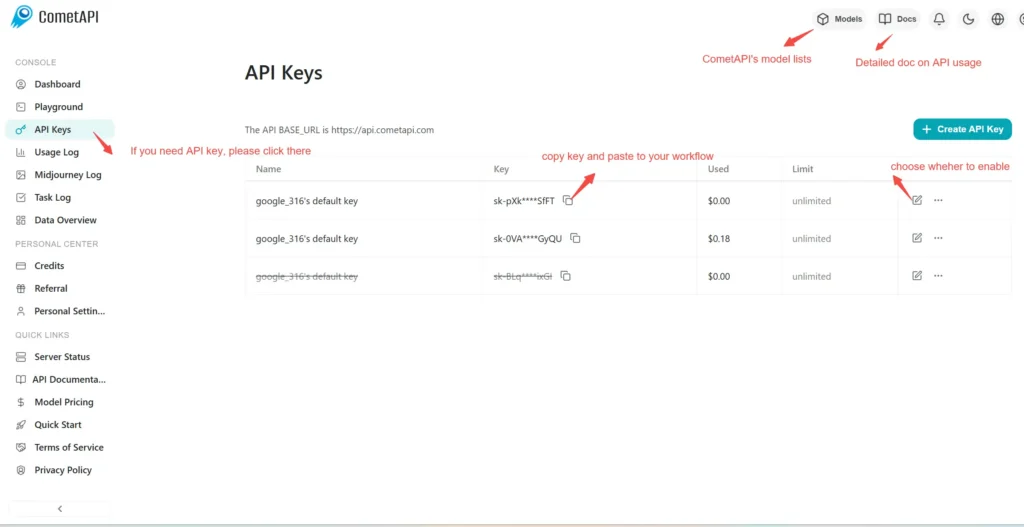
Step 2: Send Requests to Flux.2 dev API
Select the “black-forest-labs/flux-2-dev ”endpoint to send the API request and set the request body. The request method and request body are obtained from our website API doc. Our website also provides Apifox test for your convenience. Replace <YOUR_API_KEY> with your actual CometAPI key from your account.
Insert your question or request into the content field—this is what the model will respond to . Process the API response to get the generated answer.
Step 3: Retrieve and Verify Results
Process the API response to get the generated answer. After processing, the API responds with the task status and output data.
CometAPI Now Supporting Replicate Format Models: 🔹 black-forest-labs/flux-2-pro 🔹 black-forest-labs/flux-2-dev 🔹 black-forest-labs/flux-2-flex
Limited Time Promotion: Lower than Replicate Official Pricing!
👇 Start Building Now Create Predictions – API Doc
⚡ Flexible Selection:
- Pro: Designed for high-efficiency production and fast delivery.
- Flex: Maximizes image quality with adjustable parameters.
- Dev: Developer-friendly optimization.